
200-901 · Question #66
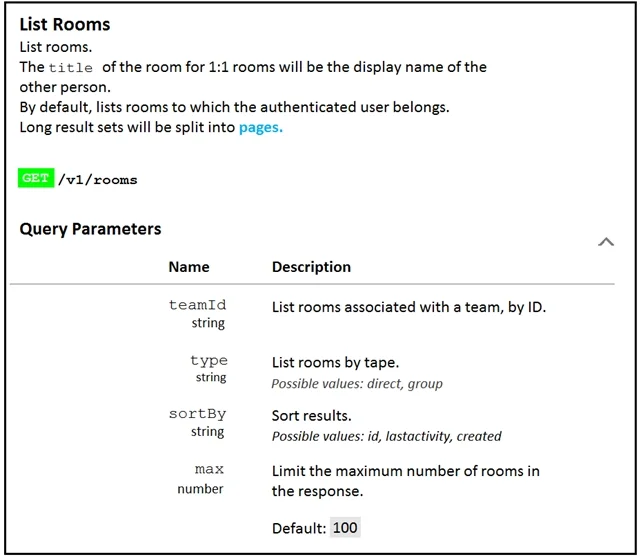
FILL BLANK Refer to the exhibit. Fill in the blank to complete the query parameter and value so that the result set is returned in reverse chronological order (most recent first) based on when…
The correct answer is B. ?sortBy=lastactivity. The Webex Rooms API sortBy=lastactivity parameter orders rooms by the timestamp of the most recent message activity, returning the most recently active room first.
Question
Exhibit
Options
- A?sortBy=id
- B?sortBy=lastactivity
- C?sortBy=created
How the community answered
(52 responses)- A6% (3)
- B83% (43)
- C12% (6)
Why each option
The Webex Rooms API sortBy=lastactivity parameter orders rooms by the timestamp of the most recent message activity, returning the most recently active room first.
sortBy=id sorts rooms by their system-assigned unique identifier, which reflects creation order and has no relationship to when messages were last entered.
The Webex Rooms API supports the sortBy query parameter, and the value 'lastactivity' sorts the result set by the date and time of the last message posted in each room. This returns rooms in reverse chronological order of message activity, satisfying the requirement to see the most recently used rooms first.
sortBy=created sorts rooms by the date the room itself was created, not by when messages were most recently posted inside it.
Concept tested: Webex Rooms API sortBy query parameter for message activity ordering
Source: https://developer.webex.com/docs/api/v1/rooms/list-rooms
Topics
Community Discussion
No community discussion yet for this question.