
200-901 · Question #406
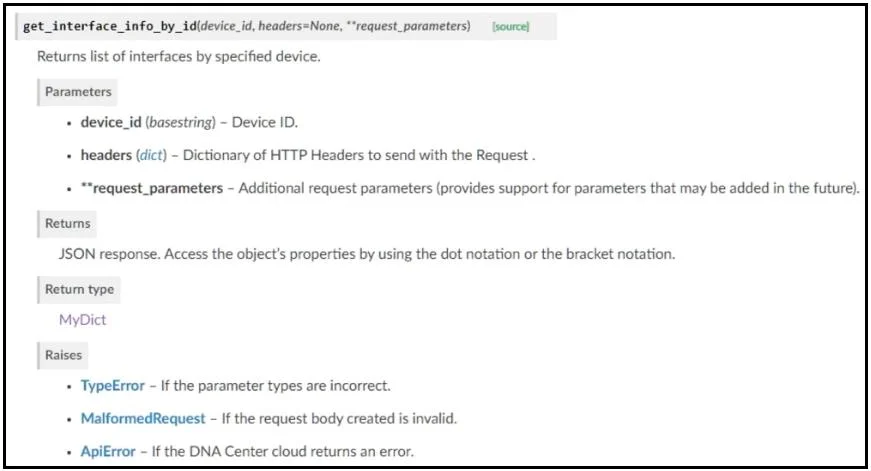
Drag and Drop Question Refer to the exhibit. Drag and drop the code from the bottom onto the box where the code is missing to return the number of interfaces on a network device by using the Cisco…
The correct answer is device_id; DNACenterAPI; port_list; devices. This question requires correctly completing a Python script to retrieve device interface information using the Cisco DNA Center SDK by filling in variable names, class instantiation, and SDK module access.
Question
Drag and Drop Question Refer to the exhibit. Drag and drop the code from the bottom onto the box where the code is missing to return the number of interfaces on a network device by using the Cisco DNA Center SDK. Not all options are used. Answer:
Exhibit
Answer Area
Drag items
Correct arrangement
- device_id
- DNACenterAPI
- port_list
- devices
Explanation
This question requires correctly completing a Python script to retrieve device interface information using the Cisco DNA Center SDK by filling in variable names, class instantiation, and SDK module access.
Approach. The correct interaction is to drag and drop the following options into the blanks:
- Blank 1 (variable assignment): Drag
device_idto the first blank. The value'da4606c3-63ad-4ed4-8f35-6bfec7c2df04'is a UUID, which serves as an identifier for a network device. Theget_interface_info_by_idfunction, as shown in Exhibit 1, explicitly takes adevice_idas a parameter. - Blank 2 (class instantiation): Drag
DNACenterAPIto the second blank. The linefrom dnacentersdk import DNACenterAPIimports theDNACenterAPIclass. To create an instance of the API client, this class must be called (e.g.,DNACenterAPI(...)). - Blank 3 (list variable): Drag
port_listto the third blank. The list comprehension[item['portName'] for item in ...]is constructing a list of port names. The subsequentprintstatement useslen(port_list), clearly indicating that the variableport_listis intended to hold this generated list. - Blank 4 (SDK module access): Drag
devicesto the fourth blank. In thednacentersdk, API calls are typically organized into logical modules or categories accessible as attributes of the mainDNACenterAPIobject instance (dnac). Operations related to managing and retrieving information about network devices are commonly grouped under adevicesattribute (e.g.,dnac.devices.get_interface_info_by_id). This follows a common pattern in well-designed SDKs.
Common mistakes.
- common_mistake. Using
router_idinstead ofdevice_idfor the first blank is incorrect becausedevice_idis the generic and explicit parameter for the function, and not all network devices are routers. UsingDNACinstead ofDNACenterAPIfor the second blank is wrong becauseDNACis the variable name assigned to the instantiated object, not the class itself used for instantiation. Usingroutersinstead ofdevicesfor the fourth blank is incorrect becausedevicesis a broader and more common module name within an SDK to encompass all types of network devices and their related operations, whereasrouterswould imply a narrower scope and might not contain theget_interface_info_by_idmethod. The remaining options likeDNAC(variable name),router_id(too specific),routers(too specific), andDNACenterAPI(class, already used) are not suitable for the module access.
Concept tested. Understanding and applying the structure and usage of Python SDKs (Software Development Kits) for network automation, specifically with the Cisco DNA Center SDK. This includes knowledge of class instantiation, method calls, parameter identification from documentation, and recognizing common SDK object hierarchies for API resource access.
Topics
Community Discussion
No community discussion yet for this question.