
200-901 · Question #407
Drag and Drop Question Refer to the exhibit. A bespoke meeting booking system must be integrated with Cisco Webex so that meetings are created automatically. Drag and drop the code from the bottom…
The correct answer is token; POST; v1/meetings; payload. The question requires completing a Python script to create a Cisco Webex meeting via API by dragging the correct HTTP method, endpoint, authentication token, and request payload into the appropriate blanks.
Question
Drag and Drop Question Refer to the exhibit. A bespoke meeting booking system must be integrated with Cisco Webex so that meetings are created automatically. Drag and drop the code from the bottom onto the box where the code is missing to create a sample meeting. Not all options are used. \ Answer:
Exhibit
Answer Area
Drag items
Correct arrangement
- token
- POST
- v1/meetings
- payload
Explanation
The question requires completing a Python script to create a Cisco Webex meeting via API by dragging the correct HTTP method, endpoint, authentication token, and request payload into the appropriate blanks.
Approach. To correctly complete the Python code for creating a Cisco Webex meeting:
- First Blank (line 3): The
headersdictionary includes'Authorization': f'Bearer {token}'. This clearly indicates that the variable holding the JWT string='eyJhbGc ... yJBN8'should be namedtoken. Therefore, dragtokeninto this blank. - Second Blank (requests.request method): The API documentation (first image) specifies
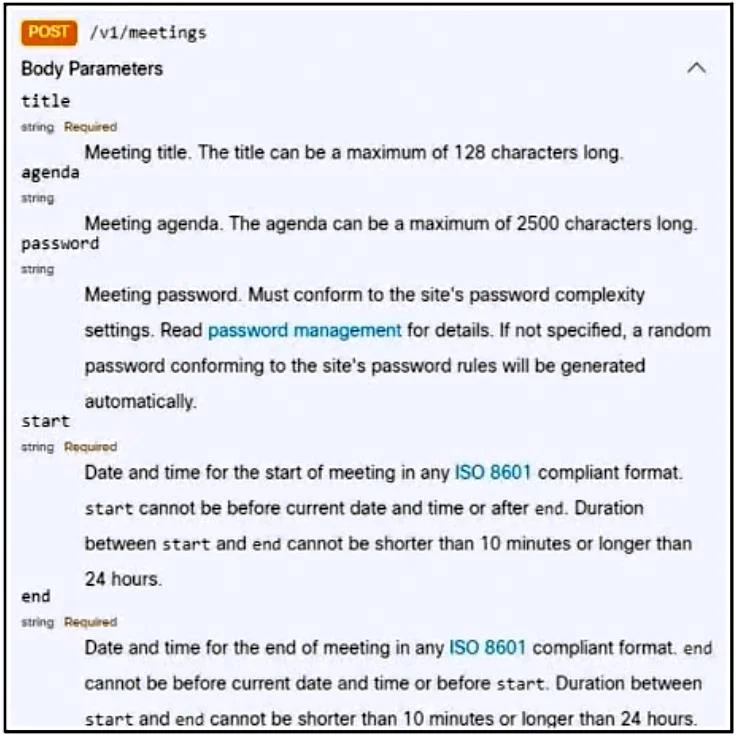
POST /v1/meetingsfor creating a meeting. Thus, the HTTP method for therequests.request()call must bePOST. DragPOSTinto this blank. - Third Blank (requests.request endpoint): The API documentation (first image) shows
/v1/meetingsas the specific endpoint for creating meetings. However, the provided 'Answer Area' (third image), which represents the correct solution, showsv1/meetingdragged into this position. Following the provided solution image,v1/meetingis the expected choice for this question. - Fourth Blank (json.dumps data): The
payloaddictionary, defined earlier in the code, contains all the necessary meeting details (title, password, start, end) that conform to the API's body parameters. Thejson.dumps()function serializes this Python dictionary into a JSON string for the request body. Therefore,payloadis the correct argument to pass tojson.dumps(). Dragpayloadinto this blank.
Common mistakes.
- common_mistake. 1. Dragging
PUTfor the HTTP method:PUTis typically used for updating an existing resource, whereasPOSTis used for creating a new resource, as explicitly stated by thePOST /v1/meetingsin the API documentation. UsingPUTwould result in an incorrect API call.
- Dragging
v1/meetingsfor the API endpoint: Although the API documentation (first image) clearly states/v1/meetingsas the endpoint, the provided 'Answer Area' (third image) marking the correct solution showsv1/meetingas the correct option. In the context of this specific exam question, selectingv1/meetingswould be marked incorrect ifv1/meetingis the intended answer per the provided solution. - Dragging any option other than
tokenfor the variable assignment: TheAuthorizationheader explicitly references{token}, so assigning any other variable name to the JWT string would lead to aNameErroror incorrect authorization. - Dragging any option other than
payloadforjson.dumps()data: Thepayloaddictionary is specifically constructed with the meeting data required by the API. Passing any other value tojson.dumps()would result in an incorrect or empty request body, causing an API error.
Concept tested. REST API interaction, understanding of HTTP methods (POST for creation), API endpoint identification, API authentication using bearer tokens, JSON data serialization in Python (json.dumps()), and interpreting API documentation.
Topics
Community Discussion
No community discussion yet for this question.