
200-901 · Question #405
Drag and Drop Question Refer to the exhibit. Drag and drop the actions from the left that the contents of this Dockerfile accomplish onto the right. Not all options are used. Answer:
The correct answer is Pull the image myImage.; Establish a volume whose root is "/data".; Put the user in a shell inside the container. This question tests the understanding of fundamental Dockerfile instructions by requiring the test-taker to match common Dockerfile actions to their logical sequence in an image build process.
Question
Drag and Drop Question Refer to the exhibit. Drag and drop the actions from the left that the contents of this Dockerfile accomplish onto the right. Not all options are used. Answer:
Exhibit
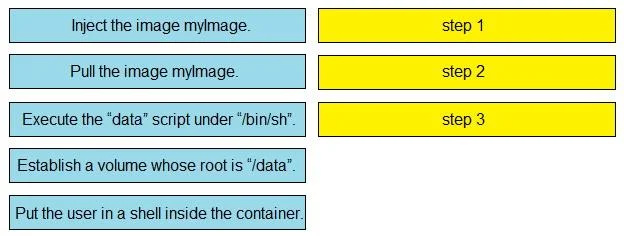
Answer Area
Drag items
Correct arrangement
- Pull the image myImage.
- Establish a volume whose root is "/data".
- Put the user in a shell inside the container.
Explanation
This question tests the understanding of fundamental Dockerfile instructions by requiring the test-taker to match common Dockerfile actions to their logical sequence in an image build process.
Approach. Based on the logical flow and common instructions found in a Dockerfile, the correct interaction is to drag the following actions to their respective steps:
-
Drag 'Pull the image myImage.' to 'step 1'.
- Reasoning: The
FROMinstruction is almost always the first command in a Dockerfile, specifying the base image. When a Dockerfile withFROM myImageis processed, Docker first pullsmyImageif it's not already available locally. Thus, 'Pull the image myImage' is the foundational first step.
- Reasoning: The
-
Drag 'Establish a volume whose root is "/data".' to 'step 2'.
- Reasoning: The
VOLUMEinstruction (VOLUME /data) defines a mount point for persistent data. This is typically done after the base image is established and before application-specific commands or entrypoints, ensuring the volume is part of the image definition.
- Reasoning: The
-
Drag 'Execute the "data" script under "/bin/sh".' to 'step 3'.
- Reasoning: This action corresponds to
CMDorENTRYPOINTinstructions (e.g.,CMD ["/bin/sh", "data"]orENTRYPOINT ["/bin/sh", "data"]) which define the default command to execute when a container built from the image is run. This usually occurs towards the end of a Dockerfile, setting up the primary function of the container.
- Reasoning: This action corresponds to
Common mistakes.
-
common_mistake. The following options are incorrect for the given steps or are not standard Dockerfile actions:
-
'Inject the image myImage.': This phrasing does not correspond to any standard Dockerfile instruction. The
FROMinstruction specifies a base image, which is then 'pulled' and used as the foundation, not 'injected' in this context. -
'Put the user in a shell inside the container.': While it's possible for a container's default command (
CMDorENTRYPOINT) to be a shell, or for a user to interactively run a shell in a container, a Dockerfile itself primarily defines the image and its default command, not literally 'putting a user in a shell' as a build step. The option 'Execute the "data" script under "/bin/sh"' is a more specific and common action defined byCMDorENTRYPOINTthat dictates the container's primary process, rather than initiating an interactive user session at build time.
Concept tested. Understanding of core Dockerfile instructions, their purpose, and the typical order of operations during a Docker image build process, specifically FROM, VOLUME, and CMD/ENTRYPOINT.
Topics
Community Discussion
No community discussion yet for this question.