
200-301 · Question #1637
Lab Simulation 47 Guidelines This is a lab item in which tasks will be performed on virtual devices. - Refer to the Tasks tab to view the tasks for this lab item. - Refer to the Topology tab to…
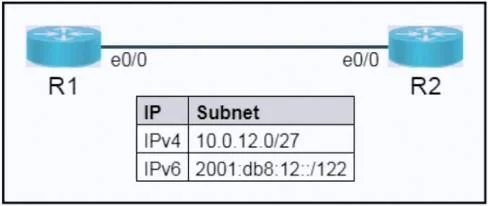
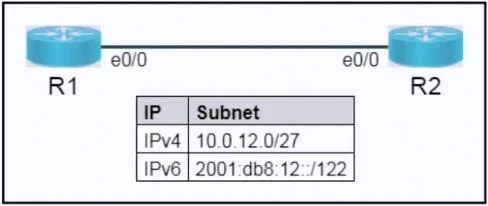
The user must configure IPv4 and IPv6 addresses on R1 and R2's e0/0 interfaces based on provided subnets and specific host addressing rules, then verify connectivity.
Question
Exhibits
Explanation
The user must configure IPv4 and IPv6 addresses on R1 and R2's e0/0 interfaces based on provided subnets and specific host addressing rules, then verify connectivity.
Approach. The correct interaction involves accessing the console of each router (R1 and R2) and configuring their respective e0/0 interfaces with the specified IPv4 and IPv6 addresses, then enabling the interfaces and saving the configuration. Finally, connectivity must be verified using the ping command.
1. Calculate IP Addresses based on Tasks:
- IPv4 Subnet 10.0.12.0/27:
- The subnet mask for /27 is 255.255.255.224.
- The network address is 10.0.12.0.
- The first usable host IP is 10.0.12.1 (for R1).
- The broadcast address is 10.0.12.31.
- The last usable host IP is 10.0.12.30 (for R2).
- IPv6 Subnet 2001:db8:12::/122:
- The task specifies using '.X host addressing derived from within IPv4'.
- For R1, the IPv4 host ends in .1, so the IPv6 host portion will be ::1. Thus, R1's IPv6 address is 2001:db8:12::1/122.
- For R2, the IPv4 host ends in .30, so the IPv6 host portion will be ::30. Thus, R2's IPv6 address is 2001:db8:12::30/122.
2. Configure R1 (CLI Commands):
enable
configure terminal
interface e0/0
ip address 10.0.12.1 255.255.255.224
ipv6 address 2001:db8:12::1/122
no shutdown
exit
copy running-config startup-config
3. Configure R2 (CLI Commands):
enable
configure terminal
interface e0/0
ip address 10.0.12.30 255.255.255.224
ipv6 address 2001:db8:12::30/122
no shutdown
exit
copy running-config startup-config
4. Verify Connectivity (CLI Commands):
- From R1:
ping 10.0.12.30(Should be successful)ping 2001:db8:12::30(Should be successful)
- From R2:
ping 10.0.12.1(Should be successful)ping 2001:db8:12::1(Should be successful)
Common mistakes.
- common_mistake. Common mistakes include incorrect IPv4 subnet calculations (e.g., using the network or broadcast address as a host IP, or an incorrect subnet mask). Another frequent error is misinterpreting the IPv6 host addressing rule, such as using default incremental addresses (::1, ::2) instead of deriving from the IPv4 address. Forgetting the
no shutdowncommand on the interface is a common oversight that leaves the interface administratively down and prevents connectivity. Lastly, failing to save the configuration (copy running-config startup-configorwrite memory) would result in losing all changes upon system reboot or exam submission.
Concept tested. Core concepts include IPv4 subnetting to identify usable host addresses and subnet masks, IPv6 addressing fundamentals including prefix lengths and host identifier derivation, and basic Cisco IOS interface configuration commands for both IPv4 and IPv6 protocols. It also tests the ability to follow specific instructions for address assignment and perform fundamental network verification using the ping command.
Topics
Community Discussion
No community discussion yet for this question.