nerdexam
CiscoCisco

200-301 · Question #1638

200-301 Question #1638: Real Exam Question with Answer & Explanation

This lab simulation tests the ability to configure host routes, static default routes, and floating static routes for path preference and failover. The correct approach involves configuring a host route on R5 pointing to R6's WAN IP, setting a primary static default route on R1 v

Submitted by kev92· Mar 5, 2026IP Connectivity - Configure and verify IPv4 and IPv6 static routing, including host routes, default routes, and floating static routes for redundancy (Cisco CCNA Exam Topic 3.3)

Question

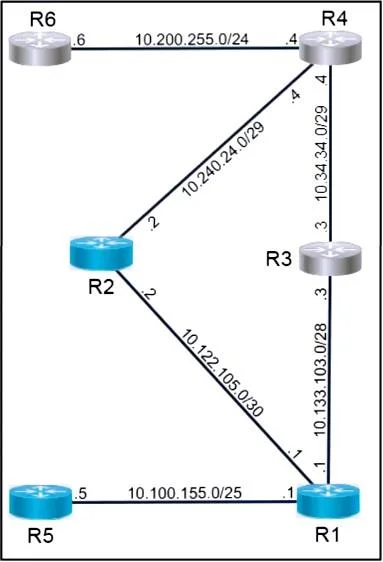
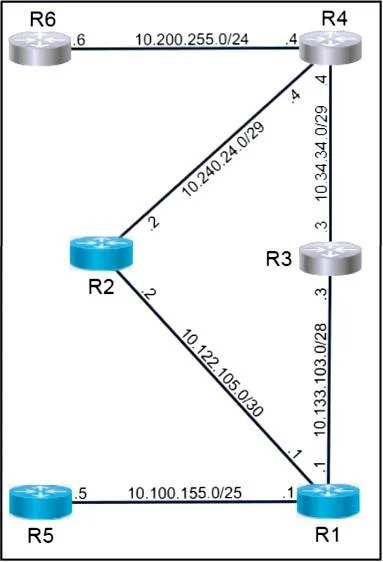
Lab Simulation 48 Guidelines This is a lab item in which tasks will be performed on virtual devices. - Refer to the Tasks tab to view the tasks for this lab item. - Refer to the Topology tab to access the device console(s) and perform the tasks. - Console access is available for all required devices by clicking the device icon or using the tab(s) above the console window. - All necessary preconfigurations have been applied. - Do not change the enable password or hostname for any device. - Save your configurations to NVRAM before moving to the next item. - Click Next at the bottom of the screen to submit this lab and move to the next question. - When Next is clicked, the lab doses and cannot be reopened. Topology Tasks Task 1 - Configure a host route on R5 for the destination of the WAN IP on R6. - Configure a static default route on R1 preferring the path through R3 towards R6. - From R5, use traceroute and ping to verify the path towards and reachability of R6. Task 2 - Configure a floating static default route on R1, preferring the path through R2 towards R6 if the link to R3 should fail. - Configure the administrative distance for 200. - Configure a static route on R2 to forward the return traffic towards 10.100.155.0/25. - After shutting interface e0/1 on R1, use traceroute and ping from R5 to verify path towards and reachability of R6. Answer: See the below explanation

Options

  • taskConfigure host and default routes on R5 and R1, including a primary default route via R3 and a floating static default route via R2 for failover. Configure a static return route on R2. Verify reachability from R5 to R6, then simulate a link failure on R1 and re-verify connectivity to ensure the floating static route functions correctly.
  • prerequisitesConsole access to virtual network devices (R1, R2, R3, R4, R5, R6) in a lab environment with pre-applied configurations.

Explanation

This lab simulation tests the ability to configure host routes, static default routes, and floating static routes for path preference and failover. The correct approach involves configuring a host route on R5 pointing to R6's WAN IP, setting a primary static default route on R1 via R3 (lower administrative distance), and a floating static default route via R2 (higher administrative distance) so it only activates when the primary path fails. Verification using traceroute and ping confirms both normal operation and failover behavior after simulating a link failure.

Topics

#Static Routing#Floating Static Routes#Administrative Distance#Route Verification and Failover

Community Discussion

No community discussion yet for this question.

Full 200-301 PracticeBrowse All 200-301 Questions