
200-301 · Question #1636
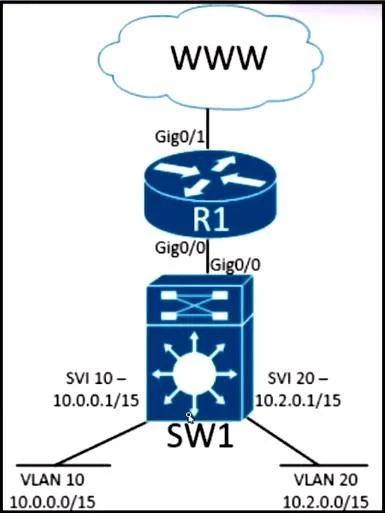
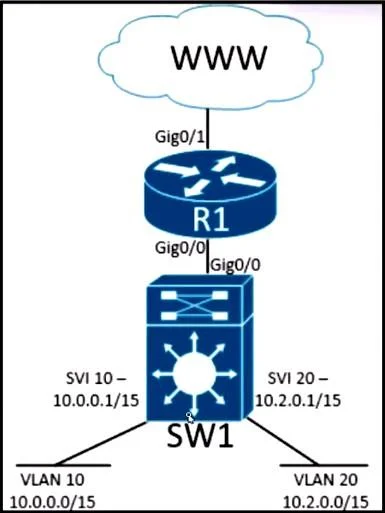
Refer to the exhibit. Inter-VLAN routing is configured on SW1. Client A is running Linux as an OS in VLAN 10 with a default gateway IP 10.0.0.1 but cannot ping client B in VLAN 20 running Windows…
The correct answer is D. Run the ifconfig command on client A to confirm that the subnet mask is set to 255.255.128.0. You need to check Client A’s subnet mask and confirm it’s 255.254.0.0. If it’s set to 255.255.128.0, Client A will not communicate properly with Client B. Use the ifconfig command to verify and fix the mask.
Question
Refer to the exhibit. Inter-VLAN routing is configured on SW1. Client A is running Linux as an OS in VLAN 10 with a default gateway IP 10.0.0.1 but cannot ping client B in VLAN 20 running Windows. What action must be taken to verify that client A has the correct IP settings?
Exhibits
Options
- ARun the ifconfig command on client A to confirm that its IP and subnet mask fall within
- BRun the ipconfig command on client A and ensure that the IP address is within the host range of
- CRun the ipconfig command on client A to confirm that the correct 10.0.0.1 default gateway is
- DRun the ifconfig command on client A to confirm that the subnet mask is set to 255.255.128.0.
How the community answered
(27 responses)- A22% (6)
- B7% (2)
- C7% (2)
- D63% (17)
Explanation
You need to check Client A’s subnet mask and confirm it’s 255.254.0.0. If it’s set to 255.255.128.0, Client A will not communicate properly with Client B. Use the ifconfig command to verify and fix the mask.
Topics
Community Discussion
No community discussion yet for this question.