
200-301 · Question #1553
Lab Simulation 34 Guidelines This is a lab item in which tasks will be performed on virtual devices. - Refer to the Tasks tab to view the tasks for this lab item. - Refer to the Topology lab to…
Lab Simulation 34: VLAN Configuration and LLDP --- Overall Goal This lab configures two Cisco switches for a converged network - one that carries both data traffic (PCs) and voice traffic (IP phones) on the same physical infrastructure, but logically separated using VLANs. The…
Question
Exhibits
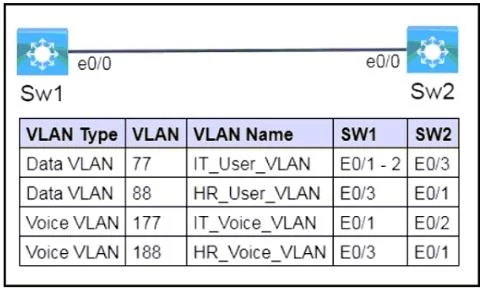
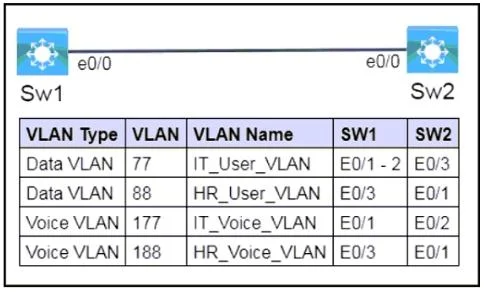
Explanation
Lab Simulation 34: VLAN Configuration and LLDP
Overall Goal
This lab configures two Cisco switches for a converged network - one that carries both data traffic (PCs) and voice traffic (IP phones) on the same physical infrastructure, but logically separated using VLANs. The final task enables LLDP so switches can discover their neighbors in a vendor-neutral way.
Core Concepts Before You Start
| Concept | What It Is |
|---|---|
| VLAN | A logical network segment - isolates broadcast domains |
| Access port | A port assigned to exactly one VLAN; frames are untagged |
| Voice VLAN | A dedicated VLAN for VoIP traffic; keeps voice off the data VLAN |
| LLDP | IEEE 802.1AB - a vendor-neutral Layer 2 discovery protocol (vs. CDP, which is Cisco-proprietary) |
Task 1: Create and Name VLANs
SW-1(config)# vlan 77
SW-1(config-vlan)# name IT_User_VLAN
Why this is necessary:
- VLANs don't exist until you create them. A switch won't assign traffic to VLAN 77 until VLAN 77 is defined in the VLAN database.
- Names are optional technically, but exams and real environments use them for human-readable identification. The name replaces the default
VLAN0077label inshow vlan brief.
The four VLANs and their purpose:
| VLAN ID | Name | Purpose |
|---|---|---|
| 77 | IT_User_VLAN | Data traffic for IT department PCs |
| 88 | HR_User_VLAN | Data traffic for HR department PCs |
| 177 | IT+Voice_VLAN | VoIP traffic for IT department phones |
| 188 | HR_Voice_VLAN | VoIP traffic for HR department phones |
The pairing is intentional: each department has a data VLAN and a matching voice VLAN, keeping voice traffic separated from data for QoS and security.
What goes wrong if skipped:
- If you try to assign an interface to VLAN 77 before creating it, on some IOS versions the VLAN is auto-created but without a name - you'll fail the naming requirement.
- On stricter IOS versions, assigning a non-existent VLAN to a port leaves the port inactive.
Important note: Both switches must have identical VLAN databases for end-to-end communication. That's why you run the same VLAN creation commands on both SW1 and SW2.
Task 2: Assign VLANs to Interfaces (Access Mode)
SW-1(config)# interface range E0/1-2
SW-1(config-if)# switchport mode access
SW-1(config-if)# switchport access vlan 77
switchport mode access - Why it's required
This command does two things:
- Forces the port into access mode (non-trunking) - it will never negotiate a trunk with a neighbor
- Makes the port carry exactly one VLAN, untagged
The lab explicitly says "non-trunking, non-tagged, single-VLAN" - this is the exact definition of an access port.
Without switchport mode access, the port defaults to dynamic auto or dynamic desirable, meaning it might try to negotiate a trunk with whatever is plugged in. That violates the lab requirement.
switchport access vlan X - Assigns the VLAN
This places all frames arriving/leaving this port into the specified VLAN. The frame has no 802.1Q tag on the wire - the switch adds/removes the tag internally.
Voice VLAN consideration
The lab says "voice and data capabilities." Normally in production you'd use:
switchport voice vlan 177
...alongside the data VLAN to let an IP phone tag its own traffic. However, this lab specifies single-VLAN, non-tagged per port, meaning each physical port is assigned to either a data VLAN or a voice VLAN - not both simultaneously. The topology diagram (not visible here) shows which specific ports connect to phones vs. PCs.
What goes wrong if skipped or misordered:
- Skipping
switchport mode accessand only settingswitchport access vlanstill works on most IOS, but leaves the port in auto-negotiation mode - a security risk (VLAN hopping via DTP). - Setting the VLAN before the mode is generally safe, but the mode command should come first as a best practice to ensure the port is in the correct state before the VLAN assignment takes effect.
- Assigning the wrong VLAN to a port means traffic ends up in the wrong broadcast domain - PCs can't reach their gateway, phones register to the wrong subnet.
Task 3: Enable LLDP on e0/0
SW-1(config)# lldp run
SW-2(config)# lldp run
Why LLDP (not CDP)?
The question says "L2 vendor-neutral discovery protocol" - this is the key phrase:
- CDP (Cisco Discovery Protocol) = Cisco proprietary
- LLDP (Link Layer Discovery Protocol, IEEE 802.1AB) = vendor-neutral, works across Cisco, Juniper, HP, etc.
lldp run enables LLDP globally on the switch. By default, after enabling it globally, LLDP operates on all interfaces - including e0/0, which is the interface the lab specifies for neighbor discovery.
LLDP advertises information such as:
- Device hostname and capabilities
- Interface name and description
- Native VLAN (relevant here since the lab mentions broadcasting native VLAN info)
- System description and management address
What goes wrong if skipped:
- Without LLDP enabled, neighboring devices can't exchange Layer 2 topology information across e0/0.
- If you use
cdp runinstead oflldp run, you fail the "vendor-neutral" requirement even though CDP would functionally discover neighbors - it's Cisco-only. - If you enable LLDP but then disable it on e0/0 with
no lldp transmit/no lldp receive, neighbors won't be discovered on that interface.
Save to NVRAM
The lab instructions require saving before moving on:
SW-1# copy running-config startup-config
SW-2# copy running-config startup-config
Or shorthand: write memory. If you skip this, a reload wipes all your configuration since it was only in RAM.
Memory Tips
| What to Remember | How to Remember It |
|---|---|
| VLAN creation order: create -> name -> exit | Think: "Build the room, label the door, leave" |
| Access port: mode first, then VLAN | "Mode before membership" |
| LLDP = vendor-neutral | "L" for "Lingua franca" (universal language) vs. CDP = "Cisco's Dialect Protocol" |
lldp run is global | One command, all ports - no per-interface required for basic operation |
| Voice VLANs are higher numbers | 177 > 77, 188 > 88 - voice "lives above" data |
Quick Validation Commands
After configuration, use these to verify:
show vlan brief                  # Confirms VLANs exist, named, and ports assigned
show interfaces E0/1 switchport  # Confirms access mode and VLAN assignment
show lldp neighbors              # Confirms LLDP is running and sees neighbors
show lldp neighbors detail       # Shows native VLAN and full neighbor info
Topics
Community Discussion
No community discussion yet for this question.