
200-301 · Question #1332
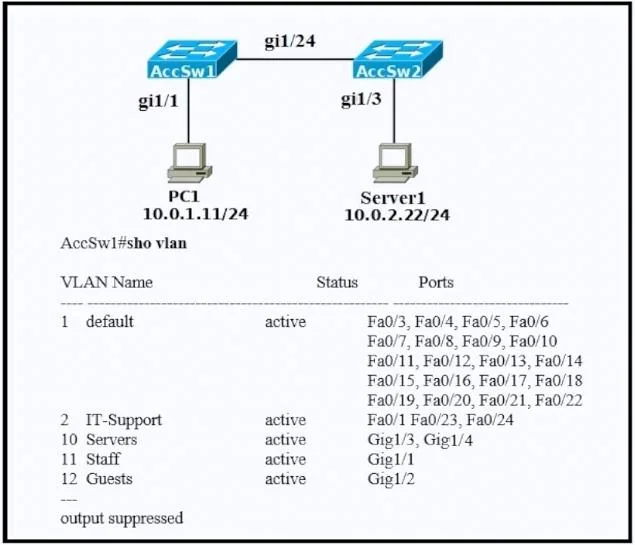
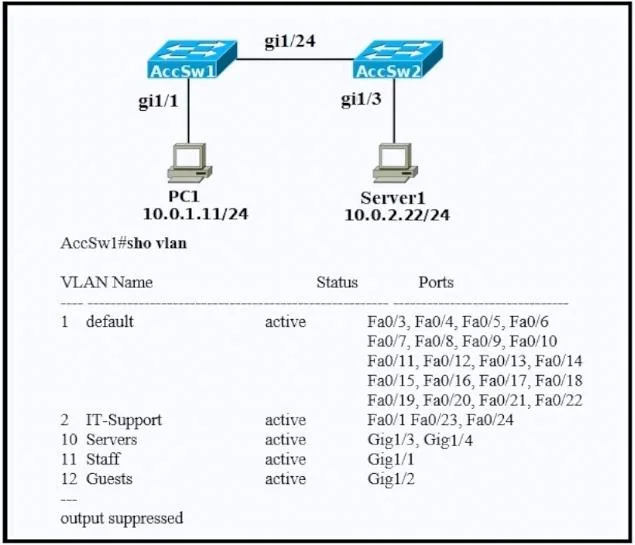
Refer to the exhibit. The engineer configured the VLANs on the new AccSw2 switch. A router-on- a-stick is connected to both switches. How must the ports be configured on AccSw2 to establish full…
The correct answer is C. interface GigabitEthernet1/3. To enable full connectivity for VLANs between AccSw2, another switch, and a router-on-a-stick, port GigabitEthernet1/3 on AccSw2 must be configured as a trunk link.
Question
Exhibits
Options
- Ainterface GigabitEthernet1/1
- Binterface GigabitEthernet1/3
- Cinterface GigabitEthernet1/3
- Dinterface GigabitEthernet1/1
How the community answered
(50 responses)- A8% (4)
- B14% (7)
- C76% (38)
- D2% (1)
Why each option
To enable full connectivity for VLANs between AccSw2, another switch, and a router-on-a-stick, port GigabitEthernet1/3 on AccSw2 must be configured as a trunk link.
Without the exhibit, GigabitEthernet1/1 is not identified as the correct port to establish the necessary trunk link for inter-VLAN communication.
This choice is identical to C, which is the designated correct answer, suggesting C is the intended option.
For inter-switch communication and router-on-a-stick setups involving multiple VLANs, the connecting port, such as GigabitEthernet1/3, must be configured as a trunk to carry traffic for all relevant VLANs.
Similar to A, GigabitEthernet1/1 is not the designated interface for this configuration in the provided correct answer.
Concept tested: VLAN trunk configuration for inter-switch links / router-on-a-stick
Source: https://www.cisco.com/c/en/us/td/docs/switches/lan/catalyst2960x/software/15_0_2_EX/vlan/configuration_guide/b_vlan_152ex_2960x_cg/b_vlan_152ex_2960x_cg_chapter_010.html
Topics
Community Discussion
No community discussion yet for this question.