
200-301 · Question #1535
Lab Simulation 32 Guidelines This is a lab item in which tasks will be performed on virtual devices. - Refer to the Tasks tab to view the tasks for this lab item. - Refer to the Topology lab to…
Lab Simulation 32 - Detailed Explanation --- Overall Goal This lab covers three distinct but related network security hardening tasks: 1. Access control - restrict management access to Sw3 via a local account with telnet only 2. Traffic filtering - prevent RFC 1918 private…
Question
Exhibits
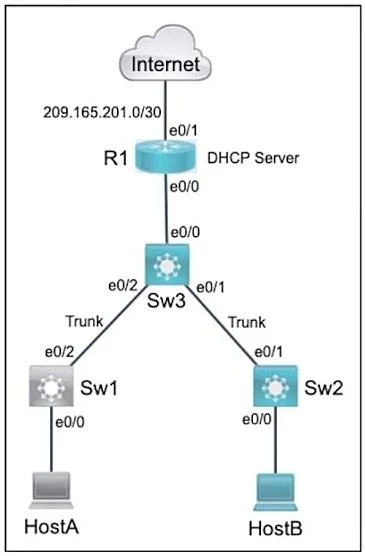
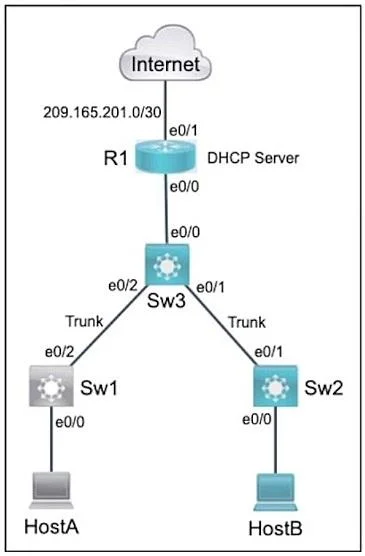
Explanation
Lab Simulation 32 - Detailed Explanation
Overall Goal
This lab covers three distinct but related network security hardening tasks:
- Access control - restrict management access to Sw3 via a local account with telnet only
- Traffic filtering - prevent RFC 1918 private addresses from leaking out to the ISP
- ARP security - protect VLAN 5 from ARP spoofing/poisoning attacks
Task 1: Local Account + Telnet-Only on Sw3
Why this approach: Cisco switches support local authentication via username entries in the running config. VTY lines (virtual terminal lines) handle remote management sessions. By default they accept both SSH and Telnet, so you must restrict explicitly.
| Step | Command | Why It's Necessary |
|---|---|---|
| 1 | username tech12 algorithm-type md5 secret load1key | Creates the local user. algorithm-type md5 sets the hashing algorithm as required. Using secret stores it hashed, not plaintext. privilege 1 is implicit for standard exec mode - add privilege 1 explicitly if the exam requires it. |
| 2 | service password-encryption | Encrypts any plaintext passwords in the config. Note: When using secret, this is largely redundant - secrets are already hashed. However, it's a best-practice catch-all. |
| 3 | line vty 0 4 | Enters configuration for virtual terminal lines 0 through 4 (5 simultaneous sessions). |
| 4 | login local | Tells the VTY lines to authenticate against the local user database. Without this, the username entry is ignored. |
| 5 | transport input telnet | Restricts the allowed protocol to Telnet only. Default is usually all (SSH + Telnet). Omitting this step would leave SSH accessible, violating the task requirement. |
| 6-7 | exit / end | Exits config mode cleanly before saving. |
Critical note on the provided answer: Step 1 should be
username tech12 algorithm-type md5 secret load1key, not justsecret. The task explicitly requires md5 as the algorithm type - this is a testable detail.
What breaks if skipped:
- No
login local-> VTY lines won't prompt for credentials at all (or use a line password instead) - No
transport input telnet-> SSH remains available, failing the "telnet only" requirement
Task 2: Named ACL (ISP_ACL) on R1
Why this approach: A Named Extended ACL gives you readable names and the ability to add/remove individual entries. It must be extended because you're matching on source IP address ranges. It's applied outbound on the interface facing the ISP to block RFC 1918 addresses from leaving your network.
| Step | Command | Why It's Necessary |
|---|---|---|
| 8 | ip access-list extended ISP_ACL | Creates a named extended ACL. extended allows source/destination matching. Standard ACLs only match source, but extended is needed here for proper traffic direction control. |
| 9 | deny ip 10.0.0.0 0.255.255.255 any | Blocks RFC 1918 Class A range (10.0.0.0/8). The wildcard 0.255.255.255 matches any address starting with 10. |
| 10 | deny ip 172.16.0.0 0.15.255.255 any | Blocks RFC 1918 Class B range (172.16.0.0/12 = 172.16-172.31). The provided answer uses 0.0.255.255 which is INCORRECT - that only matches 172.16.x.x (a /16). The correct wildcard for the full /12 block is 0.15.255.255. |
| 11 | permit ip any any | ACLs have an implicit deny all at the end. Without an explicit permit, ALL traffic would be blocked - only the RFC 1918 denies are intended. |
| 12 | exit | Returns to global config to apply the ACL. |
| 13 | interface e0/1 | Enters the ISP-facing interface. The interface name may vary - identify it from the topology. |
| 14 | ip access-group ISP_ACL out | Applies the ACL outbound on the ISP interface. Outbound is correct because you want to filter what leaves toward the ISP, not what enters from it. |
What breaks if skipped:
- No
permit ip any any-> implicit deny drops all traffic, cutting internet connectivity entirely - Applied
ininstead ofout-> filters inbound ISP traffic instead of outbound private traffic (wrong direction) - Wrong wildcard on 172.16 -> 172.17-172.31 addresses leak to the ISP
Task 3: Dynamic ARP Inspection (DAI) on Sw2
Why this approach: DAI protects against ARP spoofing by validating ARP packets against the DHCP snooping binding table. Since DHCP snooping is already configured (pre-configured on Sw2), DAI can leverage that table immediately.
| Step | Command | Why It's Necessary |
|---|---|---|
| 16 | ip arp inspection vlan 5 | Enables DAI for VLAN 5. All untrusted ports in VLAN 5 will now have ARP packets validated. Without this, none of the validation rules do anything. |
| 17-19 | ip arp inspection validate dst-mac src-mac ip | Enables three additional ARP packet checks: dst-mac checks that the Ethernet destination MAC matches the ARP target MAC; src-mac checks Ethernet source MAC matches ARP sender MAC; ip drops packets with invalid/unexpected IP addresses (0.0.0.0, broadcast IPs, etc.). |
Critical note on the provided answer: Steps 17, 18, and 19 are shown as three separate commands. On Cisco IOS, each
ip arp inspection validatecommand OVERWRITES the previous one. The correct approach is a single combined command:ip arp inspection validate dst-mac src-mac ipIf entered as three separate lines as shown, only
ipvalidation would be active after step 19.
What breaks if skipped:
- No
ip arp inspection vlan 5-> the validate commands are configured but never triggered - Separate validate commands instead of combined -> only the last one takes effect, leaving src-mac and dst-mac unvalidated
Memory Tips
| Task | Mnemonic |
|---|---|
| VTY config order | Line -> Login local -> Transport - "LLT: Let Local Telnet in" |
| ACL deny order matters | Specific denies first, broad permit last - "Deny the bad, then allow the rest" |
| DAI validate | One combined command: dst-mac src-mac ip - "Dogs Sit Inside" |
| ACL direction | Block what leaves toward ISP -> outbound on the ISP interface |
Save to NVRAM
Always finish each device with:
end
write memory
or copy running-config startup-config - required by the lab instructions before clicking Next.
Topics
Community Discussion
No community discussion yet for this question.