
200-301 · Question #1536
Lab Simulation 33 Guidelines This is a lab item in which tasks will be performed on virtual devices. - Refer to the Tasks tab to view the tasks for this lab item. - Refer to the Topology lab to…
This item provides guidelines for a lab simulation, detailing general instructions for interacting with virtual devices and specific tasks to be performed.
Question
Lab Simulation 33 Guidelines This is a lab item in which tasks will be performed on virtual devices.
- Refer to the Tasks tab to view the tasks for this lab item.
- Refer to the Topology lab to access the device console(s) and perform the tasks.
- Console access is available for all required devices by clicking the device icon or using the
tab(s) above the console window.
- All necessary preconfigurations have been applied.
- Do not change the enable password or hostname for any device.
- Save your configurations to NVRAM before moving to the next item.
- Click Next at the bottom of the screen to submit this lab and move to the next question.
- When Next is clicked, the lab closes and cannot be reopened.
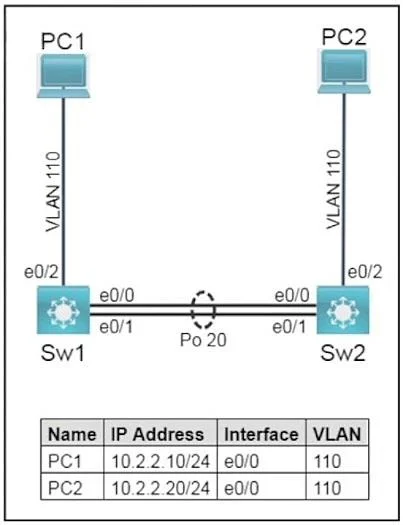
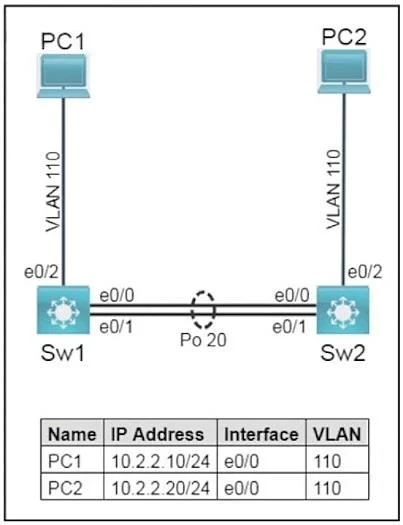
Topology Tasks Task 1 Configure trunks between Sw1 and Sw2 on ports E0/0 and E0/1 using the IEEE standard frame tagging method.
- Add VLAN 99 as untagged on the trunk ports.
- Only extend VLAN 110 and the untagged VLAN across the trunk.
- Verify that PC1 is capable of pinging PC2.
Task 2 On Sw1 and Sw2, use IEEE 802.3ad link aggregation.
- Combine E0/0 and E0/1 into a single logical link while leaving the trunk configurations intact.
- Assign number 20 to the link.
- Both links must negotiate aggregation.
Answer:
Task 1:
Sw1:
interface e0/0 switchport mode trunk switchport trunk encapsulation dot1q switchport trunk allowed vlan 110,99 switchport trunk native vlan 99 interface e0/1 switchport mode trunk switchport trunk encapsulation dot1q switchport trunk allowed vlan 110,99 switchport trunk native vlan 99 Sw2:
interface e0/0 switchport mode trunk switchport trunk encapsulation dot1q switchport trunk allowed vlan 110,99 switchport trunk native vlan 99 interface e0/1 switchport mode trunk switchport trunk encapsulation dot1q switchport trunk allowed vlan 110,99 switchport trunk native vlan 99 Task 2:
Sw1:
interface range e0/0 - e0/1 channel-group 1 mode active interface Port-channel1 no shutdown Sw2:
interface range e0/0 - e0/1 channel-group 1 mode active interface Port-channel1 no shutdown
Exhibits
Explanation
This item provides guidelines for a lab simulation, detailing general instructions for interacting with virtual devices and specific tasks to be performed.
Concept tested. Lab simulation instructions and tasks
Topics
Community Discussion
No community discussion yet for this question.