
200-301 · Question #1534
Lab Simulation 31 Guidelines This is a lab item in which tasks will be performed on virtual devices. - Refer to the Tasks tab to view the tasks for this lab item. - Refer to the Topology lab to…
Lab Simulation 31 - Task 1 Explanation Overall Goal The objective is to establish a verified end-to-end path from R5 to a specific host (10.200.220.6, which lives behind R6) by: 1. Giving R5 a precise route to that host. 2. Giving R1 a way to forward any unknown traffic toward…
Question
Lab Simulation 31 Guidelines This is a lab item in which tasks will be performed on virtual devices.
- Refer to the Tasks tab to view the tasks for this lab item.
- Refer to the Topology lab to access the device console(s) and perform the tasks.
- Console access is available for all required devices by clicking the device icon or using the
tab(s) above the console window.
- All necessary preconfigurations have been applied.
- Do not change the enable password or hostname for any device.
- Save your configurations to NVRAM before moving to the next item.
- Click Next at the bottom of the screen to submit this lab and move to the next question.
- When Next is clicked, the lab closes and cannot be reopened.
Topology Tasks Task 1
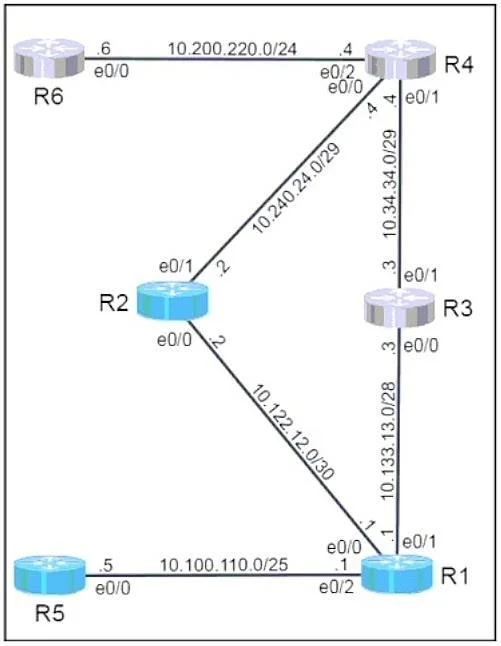
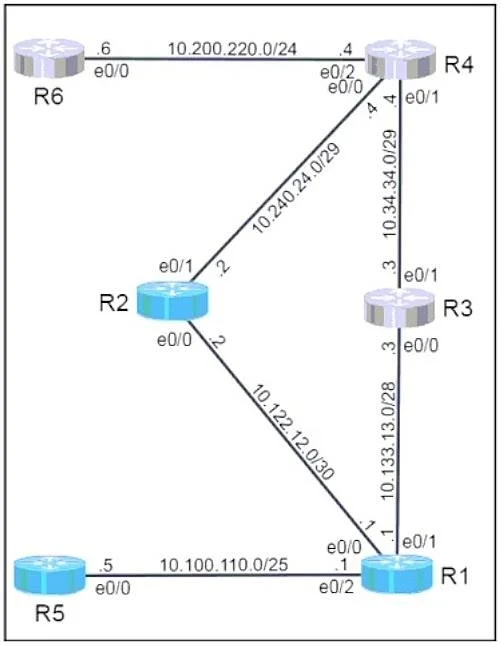
- Configure a host route on R5 for the destination of 10.200.220.6.
- Configure a static default route on R1 preferring the path through R3 towards R6.
- From R5, use traceroute and ping to verify the path towards and reachability of R6.
Task 2
- Configure a floating static default route on R1, preferring the path through R2 towards R6 if the
link to R3 should fail.
- Configure the administrative distance for 225.
- Configure a static route on R2 to forward the return traffic towards 10.100.110.0/25.
- After shutting interface e0/1 on R1, use traceroute and ping from R5 to verify path towards and
reachability of R6. Answer:
Task 1:
R5(config)# ip route 10.200.220.6 255.255.255.255 10.100.110.1 R1(config)# ip route 0.0.0.0 0.0.0.0 10.133.13.2 R5# traceroute 10.200.220.6 R5# ping 10.200.220.6 Task 2:
R1(config)# ip route 0.0.0.0 0.0.0.0 10.122.12.2 225 R2(config)# ip route 10.100.110.0 255.255.255.128 10.122.12.1 R1(config)# interface e0/1 R1(config-if)# shutdown R5# traceroute 10.200.220.6 R5# ping 10.200.220.6
Exhibits
Explanation
Lab Simulation 31 - Task 1 Explanation
Overall Goal
The objective is to establish a verified end-to-end path from R5 to a specific host (10.200.220.6, which lives behind R6) by:
- Giving R5 a precise route to that host.
- Giving R1 a way to forward any unknown traffic toward R6 via R3.
- Confirming both reachability and the correct path with diagnostic tools.
The topology flow is: R5 -> R1 -> R3 -> R6 (10.200.220.6)
Step-by-Step Breakdown
Step 1 - Host Route on R5
R5(config)# ip route 10.200.220.6 255.255.255.255 10.100.110.1
What it does: Installs a host route (a /32, the most specific possible prefix) on R5 pointing to next-hop 10.100.110.1 (R1's interface facing R5).
Why a host route? The task asks specifically for a route to 10.200.220.6, not to a network. A /32 mask targets exactly one IP address. This is more specific than any network-level route, so it will always win in the routing table (longest-prefix match).
Why next-hop 10.100.110.1? That is R1's address on the segment R5 is connected to. R5 has no direct path to R6, so it must hand off to R1.
If skipped: R5 has no route to 10.200.220.6 and will drop packets, making the traceroute/ping fail immediately at R5 itself.
Step 2 - Static Default Route on R1 via R3
R1(config)# ip route 0.0.0.0 0.0.0.0 10.133.13.2
What it does: Installs a default route (0.0.0.0/0 - matches everything not otherwise known) on R1, pointing to next-hop 10.133.13.2 (R3's interface toward R1).
Why a default route? R1 may not have a specific route for 10.200.220.6/32. A default route acts as a catch-all - any traffic whose destination is not in R1's routing table gets forwarded toward R3, which presumably knows how to reach R6.
Why this next-hop? The task requires the preferred path to go through R3. The address 10.133.13.2 is on the R1<->R3 link, so traffic flows R1 -> R3 -> R6.
If skipped: Packets from R5 arrive at R1 but R1 has no route to 10.200.220.6 and drops them (ICMP "unreachable" or simply silent drop). The traceroute stalls at R1.
If next-hop were pointed at R2 instead of R3: The path would not go through R3 as required, and Task 2's floating route logic would break.
Step 3 - Traceroute from R5
R5# traceroute 10.200.220.6
What it does: Sends probe packets with incrementing TTL values to map each hop in the path.
Why: Confirms the path is correct - you should see hops through R1, then R3, then R6. Reachability alone (ping) doesn't tell you which path traffic takes.
If skipped: You satisfy reachability but cannot confirm the R3-preferred path, which is explicitly required by the task.
Step 4 - Ping from R5
R5# ping 10.200.220.6
What it does: Sends ICMP Echo Requests and waits for Echo Replies to confirm two-way reachability.
Why ping after traceroute? Traceroute confirms the forward path; ping confirms that return traffic also reaches R5. If R6 has no route back to R5's subnet, ping will fail even though traceroute succeeds (asymmetric routing failure).
If skipped: You've confirmed the path but not end-to-end reachability, which is explicitly required.
What Goes Wrong Out of Order
| Scenario | Result |
|---|---|
| Ping before configuring routes | Immediate failure - no routes exist |
| Configure R1 default route but skip R5 host route | R5 drops packets before they ever reach R1 |
| Configure R5 route but skip R1 default route | Packets reach R1, stall there |
| Traceroute/ping before both routes | Misleading output; can't confirm correct behavior |
Memory Tip
Think of it as building the road before driving on it, closest router first:
"Give the source (R5) a specific road to the destination, then give the middle router (R1) a highway sign pointing the right direction - then test with traceroute (map the road) and ping (drive the round trip)."
The /32 host route = a street address. The default route = a highway on-ramp. Traceroute = GPS tracking. Ping = actually arriving and coming back.
Topics
Community Discussion
No community discussion yet for this question.