
200-301 · Question #1533
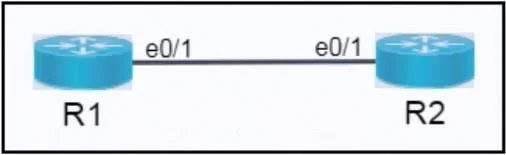
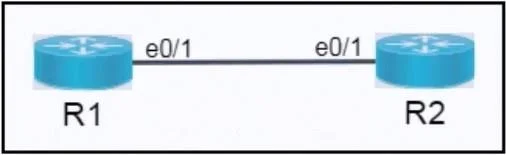
Lab Simulation 30 Guidelines This is a lab item in which tasks will be performed on virtual devices. - Refer to the Tasks tab to view the tasks for this lab item. - Refer to the Topology lab to…
Lab Simulation 30: Configuring IPv4 and IPv6 Between Two Routers --- Overall Goal The objective is to establish Layer 3 connectivity between two routers by assigning IP addresses from specific subnets to each router's interface. Both IPv4 and IPv6 must be configured. This is a…
Question
Exhibits
Explanation
Lab Simulation 30: Configuring IPv4 and IPv6 Between Two Routers
Overall Goal
The objective is to establish Layer 3 connectivity between two routers by assigning IP addresses from specific subnets to each router's interface. Both IPv4 and IPv6 must be configured. This is a foundational networking task - without correct IP addressing, no routing, pinging, or higher-level communication is possible between these devices.
Conceptual Foundation Before the Steps
IPv4 Subnetting - 192.168.168.192/28:
/28= subnet mask255.255.255.240(last octet:11110000)- Block size: 16 addresses
- Network address:
192.168.168.192(all host bits = 0) - not assignable - Broadcast address:
192.168.168.207(all host bits = 1) - not assignable - Usable host range:
.193→.206(14 hosts) - R1 gets
.193(first usable), R2 gets.206(last usable)
IPv6 Subnetting - 2001:db8:12::/125:
/125= 3 host bits → 2³ = 8 addresses- Network/subnet-router anycast address:
2001:db8:12::0- must not be assigned (task explicitly forbids it) - "Broadcast" equivalent in IPv6 (all-ones host):
2001:db8:12::7- not usable (used internally by IPv6 for subnet-router anycast in some interpretations, but regardless it's the last address) - Usable range:
::1→::6(6 addresses) - R1 gets
::1(first usable), R2 gets::6(last usable)
Note on IPv6 anycast: In IPv6, there is no broadcast. Instead, the all-zeros host address (
::0in this subnet) is the subnet-router anycast address, which routers use for certain routing functions. Assigning it to an interface would cause ambiguous behavior. That's why the task explicitly says "do not assign the subnet router anycast address."
Step-by-Step Explanation
Step 1 - Identify IPv4 Parameters
You must do the subnet math before touching the router. Miscalculating the usable range means assigning the network address (.192) or broadcast (.207) to an interface, which Cisco IOS will reject outright, or assigning an address outside the subnet entirely.
The /28 mask is the critical input. Memorize: /28 = 16 addresses, 14 usable. The first usable is always network address + 1, the last usable is always broadcast - 1.
Step 2 - Configure R1 for IPv4
R1(config)# interface Ethernet0/1
R1(config-if)# ip address 192.168.168.193 255.255.255.240
R1(config-if)# no shutdown
interface Ethernet0/1: Enters interface configuration mode for the correct physical port. If you configure the wrong interface, the address goes nowhere useful.ip address ...: Assigns the IP. You must specify both the address and the subnet mask - IOS needs the mask to know the network boundary.no shutdown: Cisco interfaces default to administratively down. Skipping this means the interface stays disabled and pings will fail even with a correct address assigned. This is one of the most common mistakes beginners make.
Step 3 - Configure R2 for IPv4
R2(config)# interface Ethernet0/1
R2(config-if)# ip address 192.168.168.206 255.255.255.240
R2(config-if)# no shutdown
Same reasoning as Step 2. Both routers must be in the same subnet for direct communication - that's why both use the /28 mask. If R2 were given a different mask (e.g., /24), it would compute a different network boundary and might not recognize R1 as a neighbor on the same segment.
Step 4 - Verify IPv4 Connectivity
R1# ping 192.168.168.206
This confirms the physical link is up, both interfaces are up/up, and addresses are correctly assigned and reachable. If the ping fails:
- Check
show interface Ethernet0/1- is it up/up? - Check
show ip interface brief- is the address correct? - Common culprits: forgot
no shutdown, wrong interface, typo in address
Verifying before moving to IPv6 isolates problems to one protocol at a time.
Step 5 - Identify IPv6 Parameters
/125 is uncommon and easy to miscalculate. The key insight:
/125leaves 3 bits for the host portion → 2³ = 8 addresses- In hex, the last group
::0through::7are the 8 addresses ::0= subnet-router anycast (forbidden by the task)::7= last address (equivalent concept to broadcast in IPv4 context)::1through::6= 6 usable addresses
Step 6 - Configure R1 for IPv6
R1(config)# interface Ethernet0/1
R1(config-if)# ipv6 address 2001:db8:12::1/125
R1(config-if)# no shutdown
ipv6 address(notip address): IPv6 is a separate protocol stack. You can have both an IPv4 and IPv6 address on the same interface simultaneously (dual-stack) - they don't conflict.- The prefix length
/125is written inline with the address (unlike IPv4 which uses a separate mask argument). no shutdownis still required for the same reason as IPv4.
If you were to accidentally assign 2001:db8:12::0/125 (the anycast address), some IOS versions will allow it but it creates routing ambiguity - packets meant for the subnet itself could be misdirected.
Step 7 - Configure R2 for IPv6
R2(config)# interface Ethernet0/1
R2(config-if)# ipv6 address 2001:db8:12::6/125
R2(config-if)# no shutdown
Same reasoning. Note ::6 is the last usable address - ::7 is avoided because it's the last address in the /125 block (analogous to broadcast in function).
Step 8 - Verify IPv6 Connectivity
R1# ping ipv6 2001:db8:12::6
You must specify ipv6 in the ping command, otherwise IOS defaults to IPv4 and will fail (or try to resolve it as an IPv4 address). This is a frequent exam mistake.
If the IPv6 ping fails but IPv4 works, check:
show ipv6 interface brief- is IPv6 enabled and address correct?- Is
ipv6 unicast-routingneeded? (In some topologies, this must be enabled globally for IPv6 routing to work, though for a direct link ping it may not be required.)
Step 9 - Save to NVRAM
R1# copy running-config startup-config
R2# copy running-config startup-config
(or write memory / wr)
The running configuration lives in RAM. If the router reboots without saving, all your work is lost. In a lab exam, failing to save means your configuration may not be evaluated correctly. Never skip this step.
What Goes Wrong If Steps Are Skipped
| Skipped Step | Consequence |
|---|---|
Forget no shutdown | Interface stays down, pings fail, no connectivity |
| Wrong interface | Address assigned to unused port, no traffic flows |
| Wrong subnet mask | Routers compute different network boundaries, can't communicate |
Assign ::0 (anycast) | Ambiguous routing behavior, violates task requirement |
| Skip NVRAM save | Config lost on reboot, lab may score zero |
Use ping instead of ping ipv6 | Tests IPv4, not IPv6 - misleading result |
Memory Tips
IPv4 usable range formula:
First usable = Network + 1 | Last usable = Broadcast - 1 | Broadcast = Network + (2^host_bits - 1)
IPv6 /125 shortcut:
3 host bits → 8 addresses → usable
::1to::6(skip::0anycast, skip::7last)
Dual-stack interfaces:
ip address= IPv4 |ipv6 address= IPv6 | Both can coexist on one interface
The "no shut" rule:
Every time you configure a Cisco interface, end with
no shutdown. Always. No exceptions in a lab.
Topics
Community Discussion
No community discussion yet for this question.