
200-301 · Question #1455
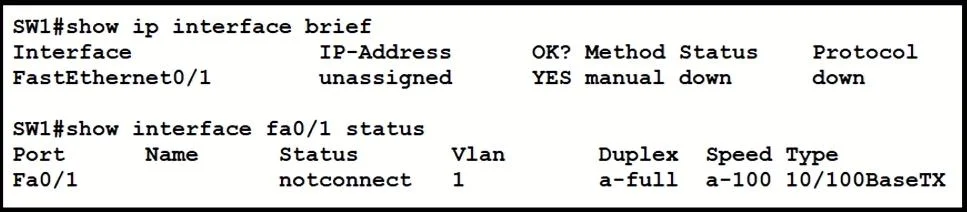
Refer to the exhibit. What is the cause of the issue?
The correct answer is B. wrong cable type. The issue, as indicated by the unseen exhibit, is a problem with the physical connection due to an incorrect type of network cable being used.
Question
Refer to the exhibit. What is the cause of the issue?
Exhibits
Options
- Ashutdown command
- Bwrong cable type
- CSTP
- Dport security
How the community answered
(44 responses)- A9% (4)
- B57% (25)
- C23% (10)
- D11% (5)
Why each option
The issue, as indicated by the unseen exhibit, is a problem with the physical connection due to an incorrect type of network cable being used.
The `shutdown` command would typically show the interface as 'Administratively Down', which is a different status than what would usually indicate a cable type issue.
Based on the correct answer, the exhibit must have shown an interface status or error message indicating a physical layer issue caused by using a cable type that is incompatible with the connection between the two devices (e.g., using a straight-through cable between two switches without Auto-MDIX).
STP (Spanning Tree Protocol) issues typically result in a port being in a blocking state, not necessarily a physical layer down/down state directly attributed to the cable.
Port security violations usually put a port into an error-disabled state due to MAC address violations, not a fundamental physical connectivity issue related to cable type.
Concept tested: Network cable types and their use
Source: https://www.cisco.com/c/en/us/td/docs/switches/lan/catalyst2960/hardware/installation/guide/C2960IG/hig_over.html
Topics
Community Discussion
No community discussion yet for this question.