
200-301 · Question #1410
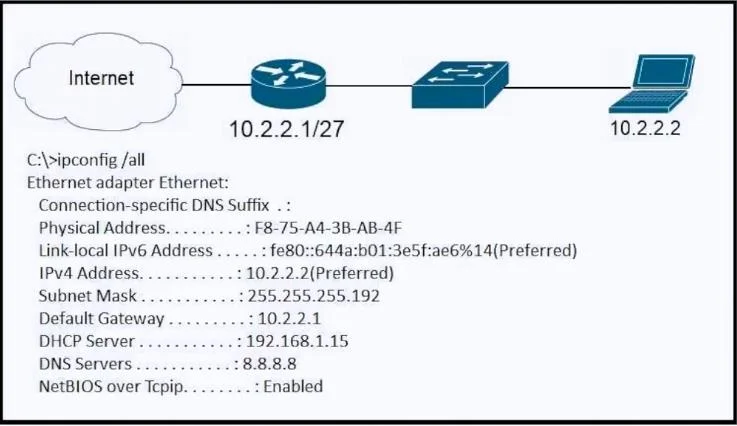
Refer to the exhibit. A newly configured PC fails to connect to the internet by using TCP port 80 to
The correct answer is A. Subnet Mask. A PC's inability to connect to the internet, specifically on TCP port 80, can be caused by an incorrect subnet mask which prevents proper communication with the local network and the default gateway.
Question
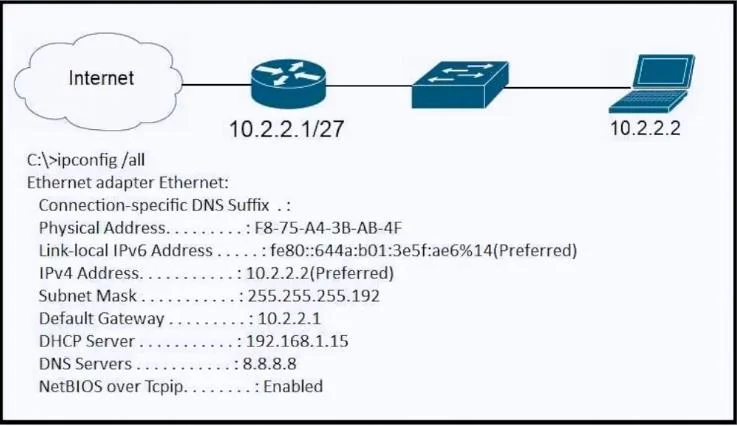
Refer to the exhibit. A newly configured PC fails to connect to the internet by using TCP port 80 to
Exhibits
Options
- ASubnet Mask
- BDNS Servers
- CDefault Gateway
- DDHCP Servers
How the community answered
(18 responses)- A83% (15)
- C11% (2)
- D6% (1)
Why each option
A PC's inability to connect to the internet, specifically on TCP port 80, can be caused by an incorrect subnet mask which prevents proper communication with the local network and the default gateway.
An incorrect subnet mask causes a PC to miscalculate its local network segment, potentially preventing it from recognizing its default gateway as being on the same local network, which is necessary to forward traffic to the internet.
Incorrect DNS servers would prevent name resolution but would still allow direct IP access to internet sites, which does not fully explain a general failure to connect via TCP port 80.
While an incorrect default gateway would prevent all internet access, an incorrect subnet mask is a more fundamental error that can prevent a PC from even attempting to use a correctly configured default gateway.
Issues with DHCP servers would typically result in no IP address configuration or an APIPA address, preventing any network connectivity, which is a broader failure than specifically failing to connect to the internet on TCP port 80.
Concept tested: IP Addressing and Subnet Masking
Source: https://www.cisco.com/c/en/us/td/docs/ios-xml/ios/ipaddr_cfg/configuration/xe-16-10/iac-xe-16-10-book/ipaddr-cfg-ip-basics.html
Topics
Community Discussion
No community discussion yet for this question.