
200-301 · Question #1353
Lab Simulation 12 Guidelines This is a lab item in which tasks will be performed on virtual devices - Refer to the Tasks tab to view the tasks for this lab item. - Refer to the Topology tab to…
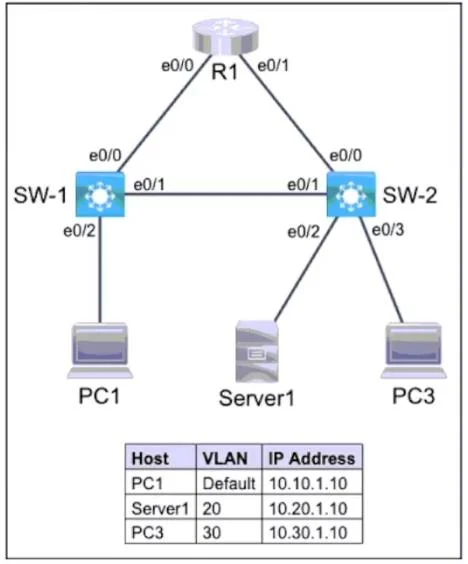
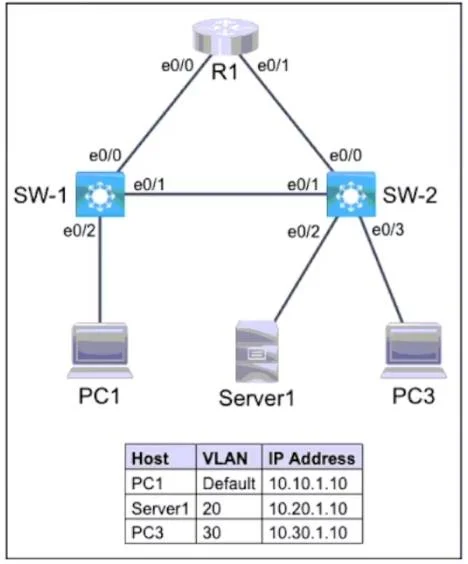
The correct interaction involves completing the switchport mode access command and then assigning the interface connecting to Server1 (eth0/2 on SW-2) to VLAN 20, as per the topology and task requirements.
Question
Exhibits
Explanation
The correct interaction involves completing the switchport mode access command and then assigning the interface connecting to Server1 (eth0/2 on SW-2) to VLAN 20, as per the topology and task requirements.
Approach. The lab simulation provides the context for configuring switch SW-2. The partial answer shows that VLAN 20 and VLAN 30 have been created and named 'SERVER1' and 'SALES' respectively, addressing Task 1 and part of Task 2's setup. The current command prompt is sw-2(config-if)#switchport m, indicating the test-taker is configuring interface eth0/2 (which connects to Server1). The task requirement states 'each port must only allow one VLAN' and the table specifies Server1 is in VLAN 20. Therefore, the correct interaction to complete Task 2 requires two commands:
mode access: This completes theswitchport mcommand to configure the interface as an access port, ensuring it belongs to a single VLAN and connects to an end device.switchport access vlan 20: This command explicitly assigns interfaceeth0/2to VLAN 20, as required for Server1 in the provided table. This fulfills the requirement of 'each port must only allow one VLAN' and assigns the correct VLAN for Server1.
Common mistakes.
- common_mistake. Common mistakes include:
- Typing
switchport mode trunk: This is incorrect becauseeth0/2connects to an end device (Server1), not another switch or a device that carries multiple VLANs. Trunk ports are used for inter-switch links or links to routers where multiple VLANs need to be transmitted. - Typing
switchport access vlan 30: This would assign Server1 to VLAN 30, which is incorrect according to the table; Server1 should be in VLAN 20. VLAN 30 is designated for PC3. - Forgetting to configure
switchport access vlan: Even ifswitchport mode accessis correctly applied, failing to assign the port to a specific VLAN will leave it in the default VLAN (VLAN 1, if not changed), preventing Server1 from communicating within VLAN 20. - Configuring the wrong interface: For example, attempting to configure
eth0/3instead ofeth0/2for Server1. The topology clearly showseth0/2connects to Server1.
Concept tested. This question primarily tests the ability to configure VLANs and switch access ports on Cisco IOS devices. Key concepts include: VLAN creation and naming, assigning interfaces to specific access VLANs, understanding the difference between access and trunk ports, and interpreting network topologies and requirements for end-device connectivity.
Topics
Community Discussion
No community discussion yet for this question.