
010-151 · Question #103
Refer to the exhibit. Which item does C represent?
The correct answer is C. Mini Storage Connector. This question tests the ability to identify server motherboard components by location, specifically the Mini Storage Connector on a Cisco UCS server.
Question
Refer to the exhibit. Which item does C represent?
Exhibit
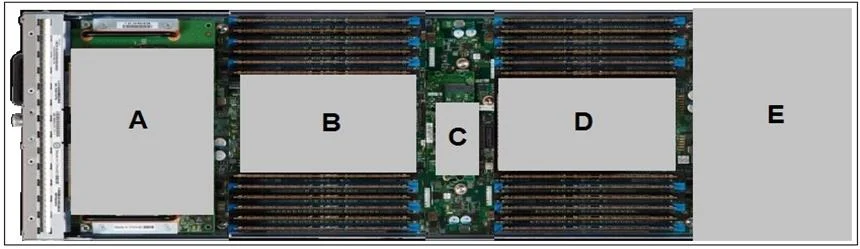
Options
- ACMOS Battery
- BInternal USB
- CMini Storage Connector
- DmLOM Connector
- EGPU
How the community answered
(27 responses)- A7% (2)
- B15% (4)
- C70% (19)
- D4% (1)
- E4% (1)
Why each option
This question tests the ability to identify server motherboard components by location, specifically the Mini Storage Connector on a Cisco UCS server.
The CMOS battery is a coin-cell component that maintains BIOS settings and the system clock when main power is removed, and has a visually distinct circular shape rather than a connector slot.
An Internal USB header is a pin-header connector used to attach internal USB flash devices for purposes such as hypervisor boot media, not a storage expansion connector.
The Mini Storage Connector is a dedicated on-board slot on Cisco UCS server motherboards designed to accept small form factor storage devices such as M.2 SSDs, providing internal storage expansion without consuming a PCIe slot or external drive bay. It is distinct from other connectors in both physical form factor and function.
The mLOM (modular LAN-on-Motherboard) connector is a Cisco-proprietary slot used exclusively for network interface cards to provide onboard LAN connectivity, not storage.
A GPU is a full discrete graphics card installed into a PCIe expansion slot and occupies a much larger physical space than a board-level mini storage connector.
Concept tested: Cisco UCS server motherboard component identification
Source: https://www.cisco.com/c/en/us/td/docs/unified_computing/ucs/c/hw/C240M5/install/C240M5.html
Topics
Community Discussion
6 Dervla O.Dec 16, 2025
The answer is C, the Mini Storage Connector. On Cisco UCS server diagrams, the mini storage connector sits in a distinct recessed slot region that is smaller than the mLOM bay but larger than what you would see for a USB header, and that physical profile is the giveaway when you read the exhibit carefully. Eliminate A first because the CMOS battery is almost always a circular coin-cell housing, eliminate E because a GPU occupies a full PCIe slot footprint, and eliminate B because an internal USB header is a small pin-block, not a keyed slot connector. D trips people up because mLOM is also a modular connector, but mLOM sits at the rear of the board in a dedicated expansion zone, while the mini storage connector is positioned toward the front or mid-board depending on the server generation.
 Bao N.Nov 23, 2025
C is right, that slot is the mini storage connector for M.2 or similar drives.
 Imani T.Nov 29, 2025
Honestly I was locked in on D thinking it had to be the mLOM connector because of where it sits on the board, but then I remembered the mLOM slot has that distinct wider form factor and the mini storage connector is the one with the more compact, recessed housing that catches you off guard if you have not physically handled one of those UCS servers before.
Bao N.Dec 1, 2025That physical handling point is huge, and I will add that once you have also seen the NVMe AIC form factor on the exam diagrams back to back with mLOM, the size difference clicks faster than any flashcard drill.
 Prof. SaraDec 11, 2025
The Mini Storage Connector is one of those board-level connectors that trips people up because it sits physically close to the mLOM slot, and without a real server in front of you the positional relationship between the two is easy to mix up. Here is my question for you: do you know what type of storage device actually plugs into that connector, and why Cisco designed that slot into the UCS C-Series motherboard rather than just routing everything through the PCIe backplane?
Bao N.Dec 14, 2025That slot is for an M.2 NVMe or SATA SSD used as a dedicated boot drive, and Cisco put it there so you can keep OS storage off the main storage backplane entirely, which means your data drives stay clean for workload use and you get a reliable, low-latency boot path without burning a PCIe slot or a hot-swap bay.