
VCP550 · Question #81
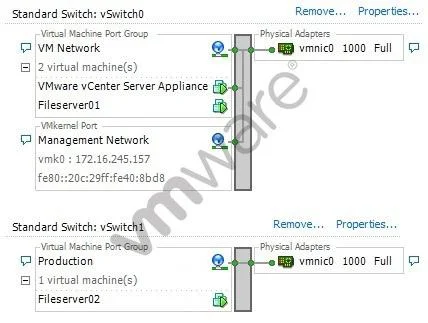
Why is the network configuration shown in the exhibit impossible?
The correct answer is A. A single vmnic cannot be shared by two virtual switches. In VMware vSphere, a physical NIC (vmnic) can only be assigned to one virtual switch at a time, making it impossible to share one vmnic across two vSwitches simultaneously.
Question
Why is the network configuration shown in the exhibit impossible?
Exhibit
Options
- AA single vmnic cannot be shared by two virtual switches.
- BThe MAC address of the Management Network VMkernel port is invalid.
- CVirtual machines are not allowed to run on the same virtual machine port group as the vCenter Server
- DVirtual Machine Port Groups and VMkernel Ports are not allowed on the same virtual switch.
How the community answered
(31 responses)- A74% (23)
- B3% (1)
- C6% (2)
- D16% (5)
Why each option
In VMware vSphere, a physical NIC (vmnic) can only be assigned to one virtual switch at a time, making it impossible to share one vmnic across two vSwitches simultaneously.
VMware's networking architecture enforces a strict one-to-one binding between a physical NIC (vmnic) and a virtual switch. If a vmnic is assigned to vSwitch0, it cannot simultaneously be assigned to vSwitch1 - the exhibit showing this configuration is therefore architecturally impossible.
VMkernel port MAC addresses follow standard formatting rules and there is no indication the address shown is invalid - invalid MAC addresses are not why the configuration is impossible.
vCenter Server as a virtual machine can share a port group with other VMs - there is no rule preventing this co-location, only a best-practice recommendation against it.
VMkernel Ports and Virtual Machine Port Groups are routinely configured on the same virtual switch simultaneously - this is a standard and supported topology in vSphere.
Concept tested: vSphere physical NIC to virtual switch binding constraints
Source: https://docs.vmware.com/en/VMware-vSphere/7.0/com.vmware.vsphere.networking.doc/GUID-350344DE-483A-42ED-B0E2-C811EE927D59.html
Topics
Community Discussion
No community discussion yet for this question.