
SVC-19A · Question #38
Drag and Drop Question has an Apple Watch and recently purchased an iPhone XR. He would like to use the Apple watch and the data on the old iPhone with the iPhone XR. Place the following steps in…
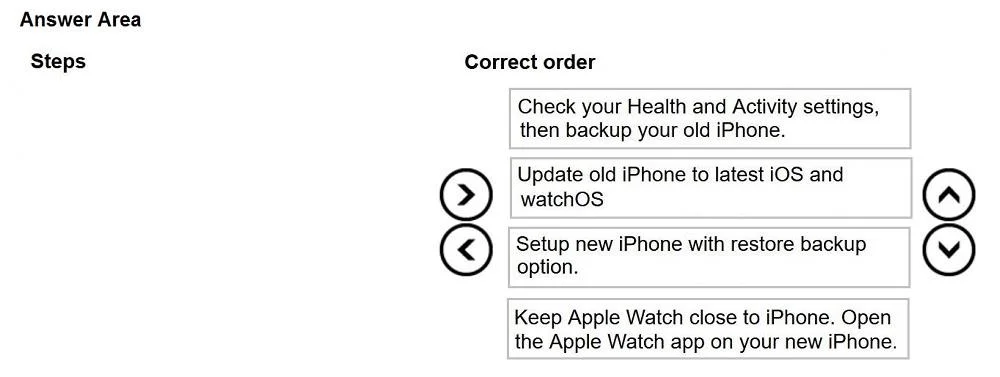
The correct answer is Check your Health and Activity settings, then backup your old iPhone.; Update old iPhone to latest iOS and watchOS; Setup new iPhone with restore backup option.; Keep Apple Watch close to iPhone. Open the Apple Watch app on your new iPhone. You've hit your limit · resets 5:20am (America/New_York)
Question
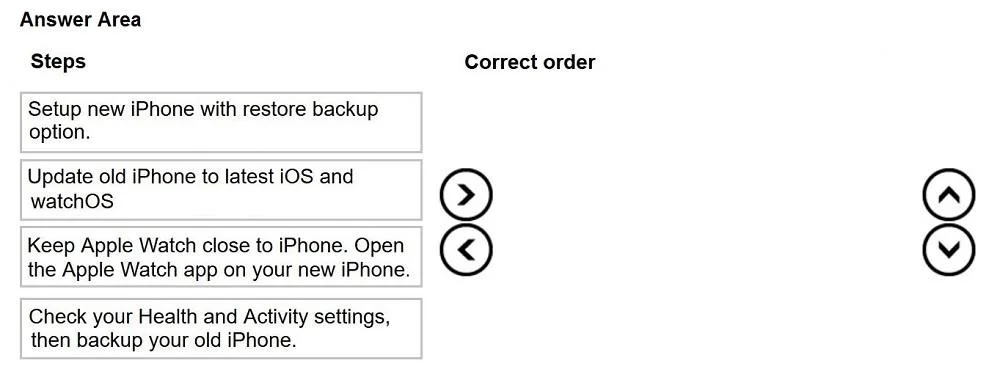
Drag and Drop Question has an Apple Watch and recently purchased an iPhone XR. He would like to use the Apple watch and the data on the old iPhone with the iPhone XR. Place the following steps in the correct order to accomplish his goal. Use the arrow buttons to move the steps from the column on the left to the area on the right and arrange the order. Answer:
Exhibits
Answer Area
Drag items
Correct arrangement
- Check your Health and Activity settings, then backup your old iPhone.
- Update old iPhone to latest iOS and watchOS
- Setup new iPhone with restore backup option.
- Keep Apple Watch close to iPhone. Open the Apple Watch app on your new iPhone.
Explanation
You've hit your limit · resets 5:20am (America/New_York)
Topics
Community Discussion
No community discussion yet for this question.