
SC-401 · Question #64
Drag and Drop Question You have a Microsoft 365 subscription that contains 20 data loss prevention (DLP) policies. You need to identify the following: - Rules that are applied without triggering a…
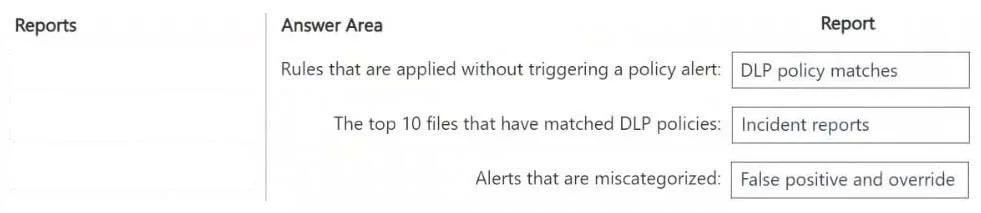
The correct answer is DLP policy matches; Incident reports; False positive and override. To identify rules applied without alerts, use 'DLP policy matches'; for top files matching policies, use 'Incident reports'; and for miscategorized alerts, use 'False positive and override' reports.
Question
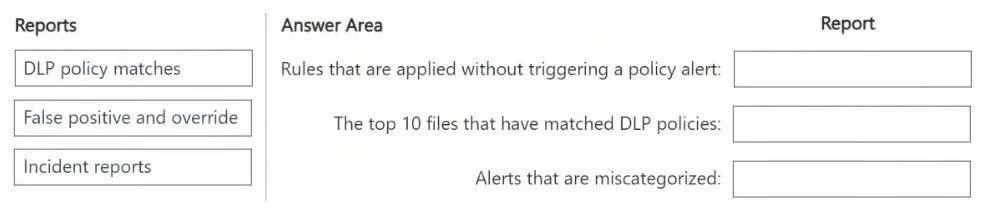
Drag and Drop Question You have a Microsoft 365 subscription that contains 20 data loss prevention (DLP) policies. You need to identify the following:
- Rules that are applied without triggering a policy alert
- The top 10 files that have matched DLP policies
- Alerts that are miscategorized
Which report should you use for each requirement? To answer, drag the appropriate reports to the correct requirements. Each report may be used once, more than once, or not at all. You may need to drag the split bar between panes or scroll to view content. NOTE: Each correct selection is worth one point. Answer:
Exhibits
Answer Area
Drag items
Correct arrangement
- DLP policy matches
- Incident reports
- False positive and override
Explanation
To identify rules applied without alerts, use 'DLP policy matches'; for top files matching policies, use 'Incident reports'; and for miscategorized alerts, use 'False positive and override' reports.
Approach. Here's the correct interaction and reasoning for each requirement:
-
Rules that are applied without triggering a policy alert: Drag 'DLP policy matches' to this requirement.
- Reasoning: The 'DLP policy matches' report provides a comprehensive overview of all content that has matched your data loss prevention policies, regardless of whether an alert was explicitly triggered or an action was taken. This report is ideal for understanding the scope of policy application, including policies operating in audit mode or those that apply restrictions without generating a high-severity alert.
-
The top 10 files that have matched DLP policies: Drag 'Incident reports' to this requirement.
- Reasoning: 'Incident reports' provide detailed information about specific policy violations that generated an alert or an incident. These reports are designed to help security teams investigate and manage significant DLP events, often including insights into the most frequently involved items or 'top files' that caused policy breaches and triggered incidents.
-
Alerts that are miscategorized: Drag 'False positive and override' to this requirement.
- Reasoning: The 'False positive and override' report is specifically designed to track instances where DLP alerts were either identified as incorrect detections (false positives) or where an authorized user chose to override the policy action. This report directly addresses the need to monitor and analyze alerts that were deemed miscategorized or handled differently than the initial policy enforcement.
Common mistakes.
- common_mistake. A common mistake is to confuse 'DLP policy matches' with 'Incident reports'. 'DLP policy matches' gives a broad view of all content that meets policy conditions, even if no explicit alert was generated (e.g., audit mode or simple restrictions). 'Incident reports', however, focus on specific policy violations that triggered an alert or an incident, providing granular details for investigation. Using 'DLP policy matches' for 'top 10 files' might give an overall count but wouldn't necessarily highlight the most critical incidents or files that warranted an alert. Similarly, applying 'DLP policy matches' or 'Incident reports' to 'alerts that are miscategorized' would be incorrect because neither report is specifically designed to track false positives or user overrides; that is the distinct purpose of the 'False positive and override' report.
Concept tested. Microsoft 365 Data Loss Prevention (DLP) reporting capabilities and the specific purposes of various DLP reports within the Microsoft Purview compliance portal.
Topics
Community Discussion
No community discussion yet for this question.