
SC-401 · Question #27
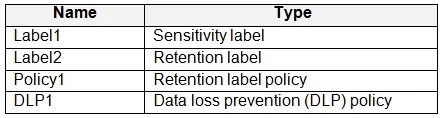
You have a Microsoft 365 E5 subscription that contains a trainable classifier named Trainable1. You plan to create the items shown in the following table. Which items can use Trainable 1?
The correct answer is D. Label2, Policy1, and DLP1 only. A trainable classifier in Microsoft Purview is used to automatically identify and classify unstructured data based on content patterns. The classifier can be used in: 1. Retention Labels (Label2) Supported Trainable classifiers can be linked to retention labels to automatically…
Question
You have a Microsoft 365 E5 subscription that contains a trainable classifier named Trainable1. You plan to create the items shown in the following table. Which items can use Trainable 1?
Exhibit
Options
- ALabel2 only
- BLabel1 and Label2 only
- CLabel1 and Policy1 only
- DLabel2, Policy1, and DLP1 only
- ELabel1, Label2, Policy1, and DLP1
How the community answered
(42 responses)- A2% (1)
- B10% (4)
- D83% (35)
- E5% (2)
Explanation
A trainable classifier in Microsoft Purview is used to automatically identify and classify unstructured data based on content patterns. The classifier can be used in: 1. Retention Labels (Label2) Supported Trainable classifiers can be linked to retention labels to automatically classify and apply retention policies to documents. 2. Retention Label Policies (Policy1) Supported Retention label policies define how and where retention labels are applied, including automatically using trainable classifiers. 3. Data Loss Prevention (DLP) Policies (DLP1) Supported Trainable classifiers can be used in DLP policies to detect and protect sensitive content
Topics
Community Discussion
No community discussion yet for this question.