
SC-401 · Question #223
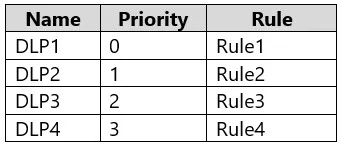
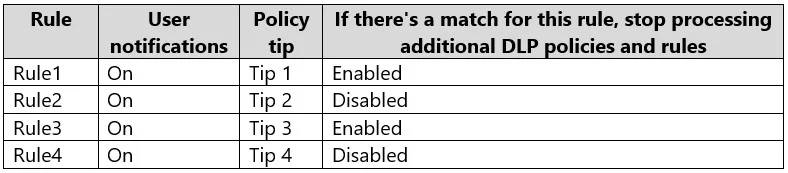
You have a Microsoft 365 E5 subscription that contains a Microsoft SharePoint Online site named Site1 and the data loss prevention (DLP) policies shown in the following table. The DLP rules are…
The correct answer is D. Change the priority of DLP2 to 0. In Microsoft Purview DLP, policies are processed in priority order where 0 is the highest priority. When content matches multiple DLP policies, only the policy tip from the highest-priority (lowest number) policy is shown to the user. If DLP2 contains 'Tip 2' and you want that…
Question
You have a Microsoft 365 E5 subscription that contains a Microsoft SharePoint Online site named Site1 and the data loss prevention (DLP) policies shown in the following table. The DLP rules are configured as shown in the following table. All the policies are assigned to Site1. You need to ensure that if a user uploads a document to Site1 that matches all the rules, the user will be shown the Tip 2 policy tip. What should you do?
Exhibits
Options
- AEnable additional processing of the policies if there is a match for Rule1.
- BPrevent additional processing of the policies if there is a match for Rule2.
- CChange the priority of DLP2 to 3.
- DChange the priority of DLP2 to 0.
How the community answered
(37 responses)- A3% (1)
- B5% (2)
- C14% (5)
- D78% (29)
Explanation
In Microsoft Purview DLP, policies are processed in priority order where 0 is the highest priority. When content matches multiple DLP policies, only the policy tip from the highest-priority (lowest number) policy is shown to the user. If DLP2 contains 'Tip 2' and you want that tip to be displayed when all rules match, DLP2 must be evaluated first - meaning it needs the highest priority. Setting DLP2's priority to 0 makes it the top-priority policy, ensuring its policy tip (Tip 2) is the one shown to the user. Option A is wrong because enabling additional processing would still show the first-matched tip; Option B (stopping processing at Rule2) would suppress DLP2's tip; Option C (priority 3) would lower DLP2's priority, not raise it.
Topics
Community Discussion
No community discussion yet for this question.