
SC-401 · Question #178
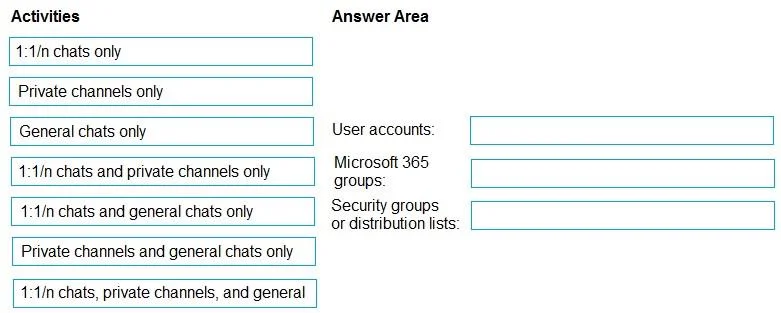
Drag and Drop Question You have a Microsoft 365 E5 subscription. You need to prevent the sharing of sensitive information in Microsoft Teams. Which entities can you protect by applying a data loss…
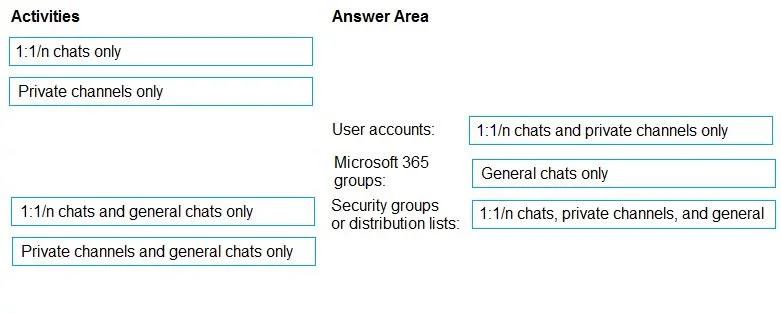
The correct answer is User accounts: 1:1/n chats and private channels only; Microsoft 365 groups: General chats only; Security groups or distribution lists: 1:1/n chats, private channels, and general. This question assesses knowledge of how Microsoft Teams Data Loss Prevention (DLP) policies are scoped to different entity types and which chat activities they protect.
Question
Exhibits
Answer Area
Drag items
Correct arrangement
- User accounts: 1:1/n chats and private channels only
- Microsoft 365 groups: General chats only
- Security groups or distribution lists: 1:1/n chats, private channels, and general
Explanation
This question assesses knowledge of how Microsoft Teams Data Loss Prevention (DLP) policies are scoped to different entity types and which chat activities they protect.
Approach. The correct interaction involves dragging the appropriate chat activity scope from the 'Activities' pane to each of the recipient entities in the 'Answer Area', as depicted in the second image:
- User accounts: Drag '1:1/n chats and private channels only' to 'User accounts:'. DLP policies applied to individual user accounts can monitor and protect content in one-to-one (1:1) or one-to-many (1:n) private chats and chats within private channels where that user is a participant. General channel chats are associated with the Microsoft 365 group and not directly with individual user accounts in this context.
- Microsoft 365 groups: Drag 'General chats only' to 'Microsoft 365 groups:'. Microsoft Teams leverages Microsoft 365 groups as their underlying membership and resource management. A DLP policy targeting a Microsoft 365 group primarily covers the 'General' channel and standard channels associated with that group, which are accessible to all group members. It does not typically encompass 1:1/n chats or private channel chats, which have different scoping.
- Security groups or distribution lists: Drag '1:1/n chats, private channels, and general' to 'Security groups or distribution lists:'. When a DLP policy is configured to target a security group or distribution list, it broadly applies to all members of that group. This allows for comprehensive protection across all types of Teams communications involving those members, including 1:1/n chats, chats within private channels, and chats within general or standard channels across any teams they are a part of, provided the policy is scoped to cover these workloads.
Common mistakes.
- common_mistake. A common mistake would be to incorrectly associate the scope of chat activities with the recipient entities. For example, dragging 'General chats only' to 'User accounts' would be incorrect because individual user accounts primarily participate in 1:1/n and private channel chats, while general chats are tied to the broader Microsoft 365 group. Similarly, applying '1:1/n chats and private channels only' to 'Microsoft 365 groups' is wrong because the primary chat type associated with a Microsoft 365 group is the general channel. Believing that a DLP policy on a 'Security group or distribution list' would have limited scope (e.g., only 1:1/n chats) is also incorrect, as these entities are typically used for broad targeting, providing the widest coverage across all chat types for their members.
Concept tested. Microsoft Teams Data Loss Prevention (DLP) policy configuration, specifically how the scope of a DLP policy (which chat types are monitored/protected) is determined by the recipient types (User accounts, Microsoft 365 groups, Security groups, or distribution lists) the policy is applied to.
Topics
Community Discussion
No community discussion yet for this question.