
SC-401 · Question #144
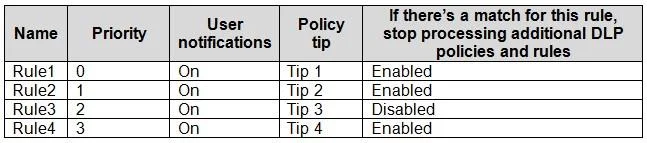
You have a Microsoft 365 E5 subscription that contains a data loss prevention (DLP) policy named DLP1. DLP1 contains the DLP rules shown in the table. You need to ensure that when a document matches…
In DLP policies, rules are processed based on their priority, with lower numbers indicating higher priority. To ensure a specific user tip from Rule2 is displayed when a document matches all rules, Rule2 must be configured with the highest priority.
Question
You have a Microsoft 365 E5 subscription that contains a data loss prevention (DLP) policy named DLP1. DLP1 contains the DLP rules shown in the table. You need to ensure that when a document matches all the rules, users will see Tip 2. What should you change?
Exhibit
Options
- Athe priority setting of Rule2 to 0
- Bthe priority setting of Rule2 to 2
- Cthe priority setting of Rule3 and Rule4 to 0
- Dthe if there's a match for this rule, stop processing additional DLP policies and rules setting
Why each option
In DLP policies, rules are processed based on their priority, with lower numbers indicating higher priority. To ensure a specific user tip from Rule2 is displayed when a document matches all rules, Rule2 must be configured with the highest priority.
Setting the priority of Rule2 to 2 would make it a lower priority than a rule with priority 0 or 1, meaning its tip might not be displayed if a higher-priority rule also matches and has a user notification.
Setting the priority of Rule3 and Rule4 to 0 would make them higher priority than Rule2 (unless Rule2 also has priority 0), causing their respective actions or tips to take precedence over Rule2's.
Enabling 'if there's a match for this rule, stop processing additional DLP policies and rules' on a rule with a higher priority than Rule2 could prevent Rule2 from being evaluated, and thus Tip 2 would not be displayed.
Concept tested: DLP policy rule priority and processing order
Source: https://learn.microsoft.com/en-us/microsoft-365/compliance/dlp-policy-simplified-template-rule-flow?view=o365-worldwide
Topics
Community Discussion
No community discussion yet for this question.