
SC-300 · Question #93
Hotspot Question You have an Azure Active Directory (Azure AD) tenant that contains three users named User1, User1, and User3. You create a group named Group1. You add User2 and User3 to Group1. You…
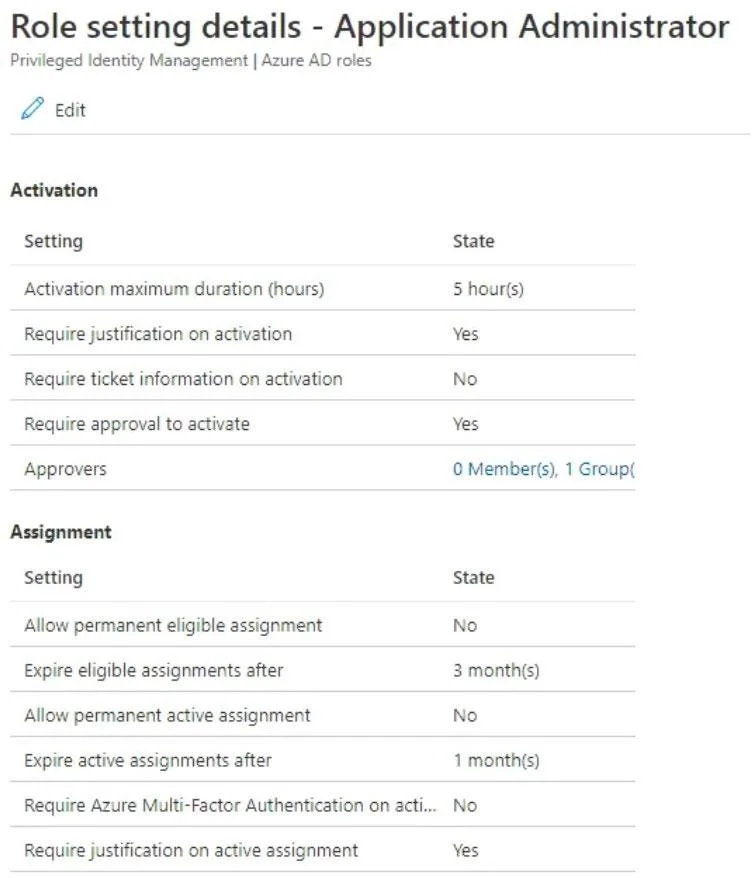
The correct answer is Require justification on activation = Yes; Require ticket information on activation = No; Require approval to activate = Yes; Allow permanent eligible assignment = No; Allow permanent active assignment = No; Require Azure Multi-Factor Authentication on acti... = No; Require justification on active assignment = Yes. This question tests understanding of Azure AD Privileged Identity Management (PIM) role assignments, eligibility, approval workflows, and the distinction between active vs. eligible assignments.
Question
Exhibits
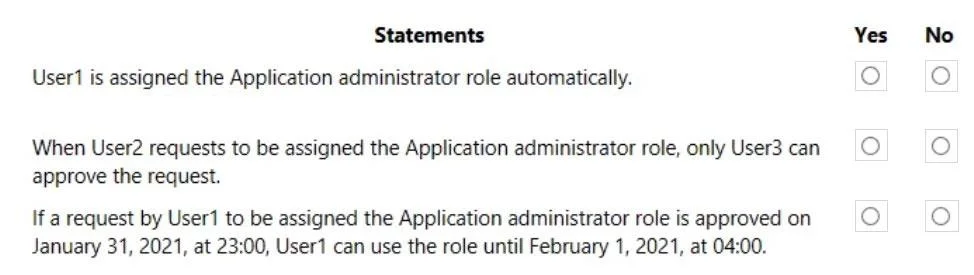
Answer Area
- Activation maximum duration (hours)
- Require justification on activationYes
- Require ticket information on activationNo
- Require approval to activateYes
- Approvers
- Allow permanent eligible assignmentNo
- Expire eligible assignments after
- Allow permanent active assignmentNo
- Expire active assignments after
- Require Azure Multi-Factor Authentication on acti...No
- Require justification on active assignmentYes
Explanation
This question tests understanding of Azure AD Privileged Identity Management (PIM) role assignments, eligibility, approval workflows, and the distinction between active vs. eligible assignments.
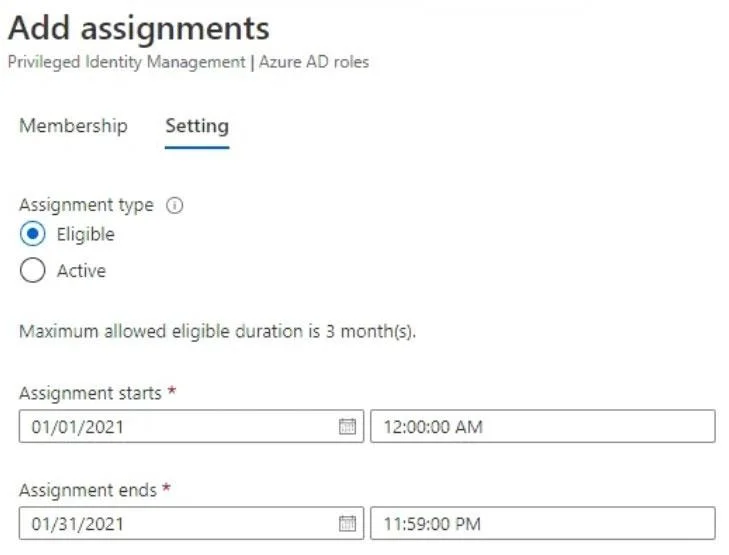
Approach. In Azure AD PIM, an 'eligible' assignment means the user must activate the role (and may need approval) before using it, while an 'active' assignment grants permanent access without activation. User2 is eligible for Application Administrator and must request activation; since Group1 (containing User2 and User3) is the approver, User2 being a member of the approver group creates a conflict - Azure AD PIM typically prevents a user from approving their own activation request, so User2 cannot approve their own request even though they are in Group1. User3 is in Group1 (the approver group) and is not eligible for the role themselves, so User3 CAN approve User2's activation request. User1 was given a direct active assignment to Application Administrator (as shown in the Assignment exhibit), meaning User1 already has the role permanently active and does NOT need to request activation or wait for approval - User1 can perform Application Administrator tasks immediately without any approval step.
Concept tested. Azure AD PIM distinguishes between 'eligible' (requires activation and possible approval) and 'active' (permanently assigned, no activation needed) role assignments. Key rules include: eligible users must activate their role before use; approvers in the approval group who are also eligible for the same role cannot approve their own requests; active assignments bypass the activation/approval workflow entirely.
Reference. Microsoft Learn: Configure Azure AD role settings in Privileged Identity Management - https://learn.microsoft.com/en-us/azure/active-directory/privileged-identity-management/pim-how-to-change-default-settings
Topics
Community Discussion
No community discussion yet for this question.