
SC-300 · Question #68
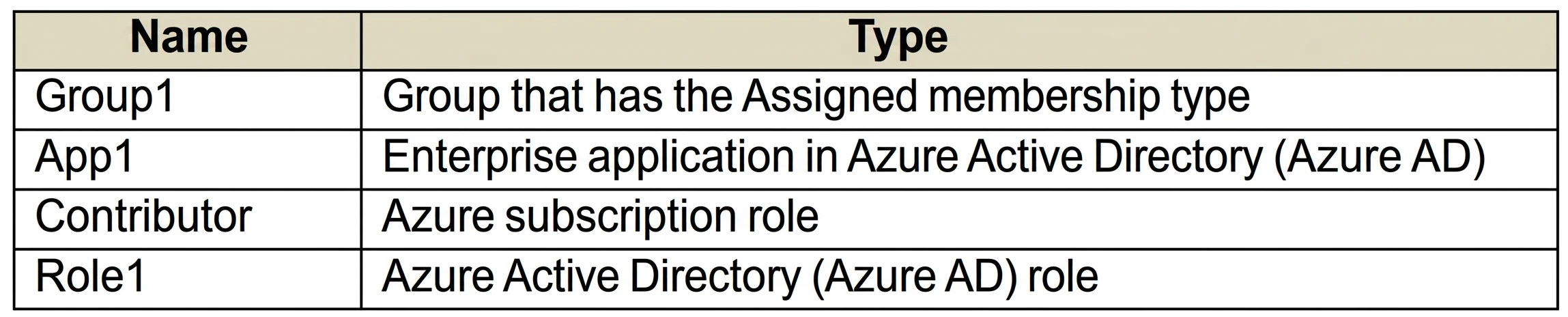
You have an Azure subscription that contains the resources shown in the following table. For which resources can you create an access review?
The correct answer is C. Group1, App1, Contributor, and Role1. Access reviews require an Azure AD Premium P2 license. Access reviews for Group1 and App1 can be configured in Azure AD Access Reviews. Access reviews for the Contributor role and Role1 would need to be configured in Privileged Identity Management (PIM). PIM is included in…
Question
You have an Azure subscription that contains the resources shown in the following table. For which resources can you create an access review?
Exhibit
Options
- AGroup1, Role1, and Contributor only
- BGroup1 only
- CGroup1, App1, Contributor, and Role1
- DRole1 and Contributor only
How the community answered
(20 responses)- A10% (2)
- B5% (1)
- C80% (16)
- D5% (1)
Explanation
Access reviews require an Azure AD Premium P2 license. Access reviews for Group1 and App1 can be configured in Azure AD Access Reviews. Access reviews for the Contributor role and Role1 would need to be configured in Privileged Identity Management (PIM). PIM is included in Azure AD Premium P2. https://docs.microsoft.com/en-us/azure/active-directory/privileged-identity-management/pim-how- to-start-security-review?toc=/azure/active-directory/governance/toc.json https://docs.microsoft.com/en-us/azure/active-directory/governance/access-reviews-overview
Topics
Community Discussion
No community discussion yet for this question.