
SC-300 · Question #51
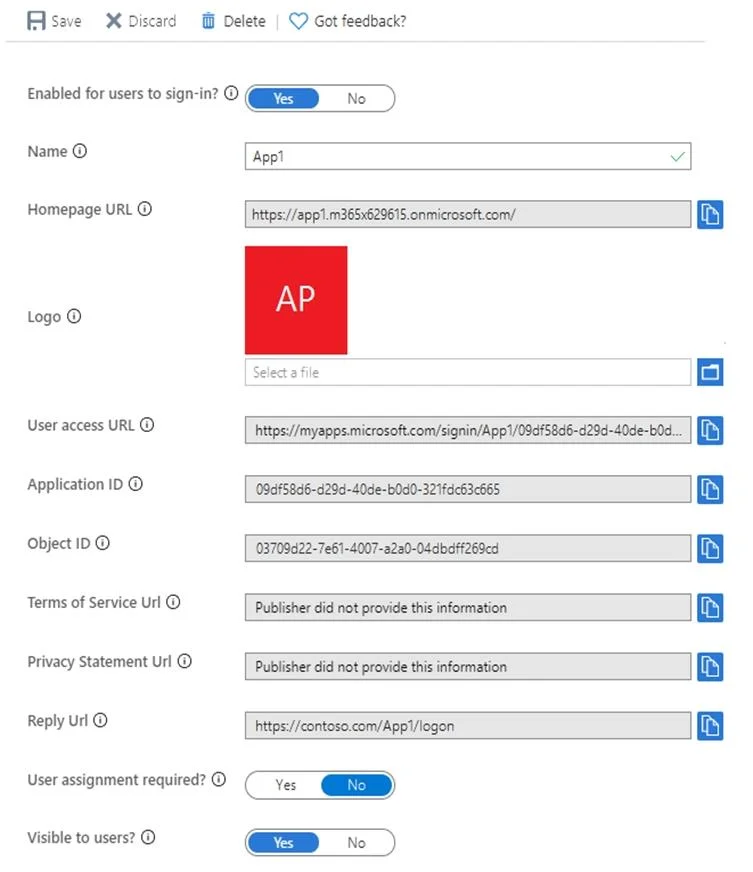
Hotspot Question You have a custom cloud app named App1 that is registered in Azure Active Directory (Azure AD). App1 is configured as shown in the following exhibit. Use the drop-down menus to…
The correct answer is Enabled for users to sign-in? = Yes; User assignment required? = No; Visible to users? = Yes. This hotspot question tests understanding of Azure AD app registration settings, specifically around token configuration, API permissions, and how they affect application behavior when accessing resources.
Question
Exhibits
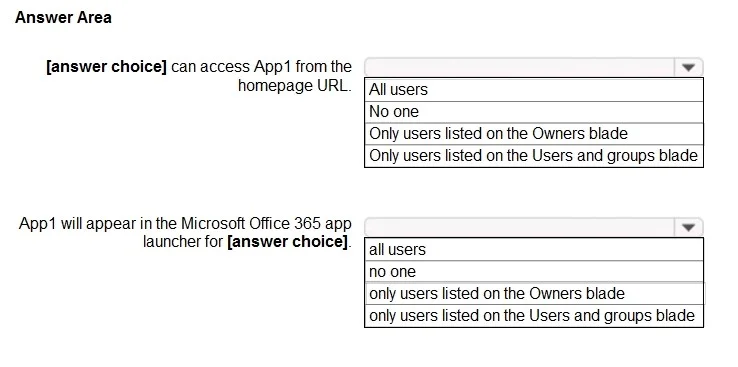
Answer Area
- Enabled for users to sign-in?Yes
- User assignment required?No
- Visible to users?Yes
Explanation
This hotspot question tests understanding of Azure AD app registration settings, specifically around token configuration, API permissions, and how they affect application behavior when accessing resources.
Approach. In Azure AD app registrations, the 'accessTokenAcceptedVersion' property in the manifest determines the token version (v1 or v2). If set to null or 1, it issues v1 tokens; if set to 2, it issues v2 tokens. The 'signInAudience' property controls who can sign into the application - 'AzureADMyOrg' means only users in the registered tenant can authenticate, 'AzureADMultipleOrgs' allows any Azure AD tenant, and 'AzureADandPersonalMicrosoftAccount' allows both organizational and personal Microsoft accounts. When API permissions are granted with 'Grant admin consent,' delegated permissions work on behalf of users while application permissions work as the app identity. The correct selections depend on the manifest values shown in the exhibit - typically the statements ask whether the app supports single-tenant or multi-tenant access, what token version is issued, and whether admin consent is required for the configured permissions.
Concept tested. Azure AD App Registration configuration including token version (accessTokenAcceptedVersion), signInAudience for tenancy scope, API permissions (delegated vs application), admin consent requirements, and how manifest settings govern authentication and authorization behavior for custom cloud applications.
Reference. https://learn.microsoft.com/en-us/azure/active-directory/develop/reference-app-manifest
Topics
Community Discussion
No community discussion yet for this question.