
SC-300 · Question #52
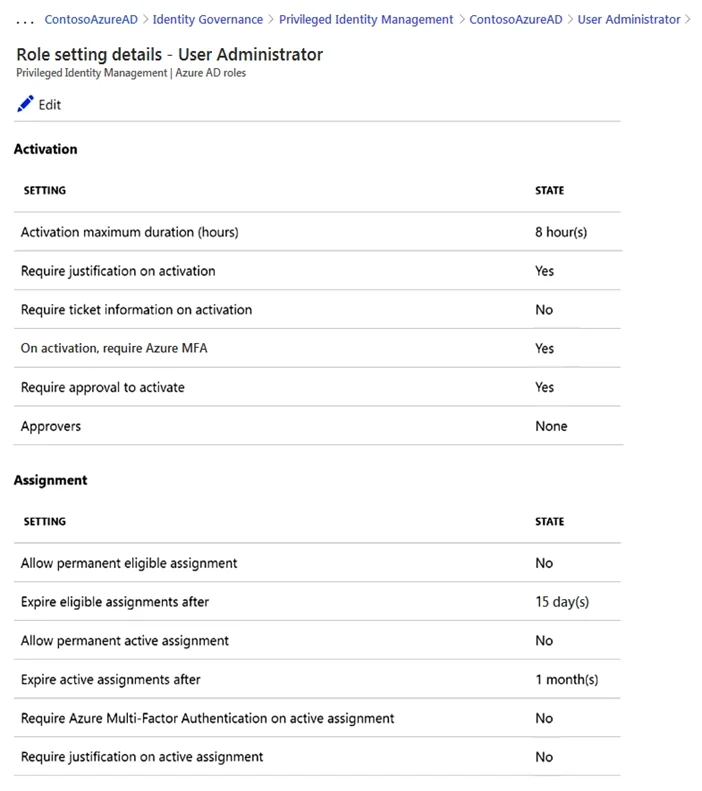
Hotspot Question You have an Azure Active Directory (Azure AD) tenant that contains Azure AD Privileged Identity Management (PIM) role settings for the User administrator role as shown in the…
The correct answer is [answer choice] can access App1 from the homepage URL: All users; App1 will appear in the Microsoft Office 365 app launcher for [answer choice]: only users listed on the Users and groups blade. This question tests general Azure AD application access and visibility principles, not directly the PIM settings shown in the exhibit. The official explanation clarifies the reasoning for each statement. Statement 1: "[answer choice] can access App1 from the homepage URL"…
Question
Exhibits
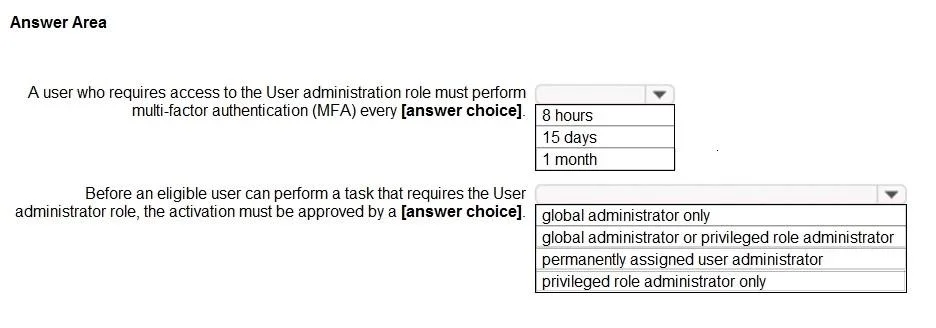
Answer Area
- [answer choice] can access App1 from the homepage URLAll usersAll usersNo oneOnly users listed on the Owners bladeOnly users listed on the Users and groups blade
- App1 will appear in the Microsoft Office 365 app launcher for [answer choice]only users listed on the Users and groups bladeall usersno oneonly users listed on the Owners bladeonly users listed on the Users and groups blade
Explanation
This question tests general Azure AD application access and visibility principles, not directly the PIM settings shown in the exhibit. The official explanation clarifies the reasoning for each statement.
Statement 1: "[answer choice] can access App1 from the homepage URL"
- Correct Answer: All users
- Explanation: As per the official explanation, if an application has "Enable for users to sign-in" selected and "User assignment required" is set to No, any user can access the application directly via its homepage URL. This configuration allows all users in the tenant to sign in to the application without needing explicit assignment.
Statement 2: "App1 will appear in the Microsoft Office 365 app launcher for [answer choice]"
- Correct Answer: only users listed on the Users and groups blade
- Explanation: The official explanation states that for an application to appear in a user's Microsoft 365 app launcher (or My Apps portal), an appropriate user or group must be explicitly assigned to the application. Even if "User assignment required" is set to No (allowing all users to access via URL), visibility in the app launcher requires an explicit assignment configured on the Users and groups blade of the application's settings.
Topics
Community Discussion
No community discussion yet for this question.