
SC-300 · Question #50
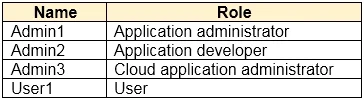
Hotspot Question You have an Azure Active Directory (Azure AD) tenant that has the default App registrations settings. The tenant contains the users shown in the following table. You purchase two…
The correct answer is Admin1 can assign users to App1 = Yes; Admin2 can assign users to App1 = No; Admin3 can assign users to App1 = Yes; User1 can assign users to App1 = No; Admin1 can register App2 in Azure AD = Yes; Admin2 can register App2 in Azure AD = Yes; Admin3 can register App2 in Azure AD = Yes; User1 can register App2 in Azure AD = Yes. This question tests knowledge of Azure AD role-based permissions for app assignment and app registration, specifically which users (based on their assigned roles) can perform these administrative tasks.
Question
Exhibit
Answer Area
- Admin1 can assign users to App1Yes
- Admin2 can assign users to App1No
- Admin3 can assign users to App1Yes
- User1 can assign users to App1No
- Admin1 can register App2 in Azure ADYes
- Admin2 can register App2 in Azure ADYes
- Admin3 can register App2 in Azure ADYes
- User1 can register App2 in Azure ADYes
Explanation
This question tests knowledge of Azure AD role-based permissions for app assignment and app registration, specifically which users (based on their assigned roles) can perform these administrative tasks.
Approach. For assigning users to App1 (which is already registered), this requires the Global Administrator, Cloud Application Administrator, Application Administrator, or the owner of the service principal - so User1 (Global Admin) and any user with an Application Administrator or Cloud Application Administrator role can do this. For registering App2 in Azure AD, by default the 'Users can register applications' setting is enabled (set to Yes) in Azure AD, meaning ALL users (including non-admin users) can register applications by default. Therefore: (1) Who can assign users to App1: User1 (Global Administrator) - as well as anyone with Application Administrator or Cloud Application Administrator roles. (2) Who can register App2: All users, because the default Azure AD tenant setting allows any member user to register applications. If the table shows specific roles like Global Admin, Application Admin, and a standard user, the standard user can still register apps due to default settings, but only admins (Global Admin, Application Admin, Cloud Application Admin) can assign users to enterprise apps.
Concept tested. Azure AD default application registration settings and role-based access control: by default all users can register apps (Users can register applications = Yes), but assigning users to an enterprise app requires Global Administrator, Application Administrator, Cloud Application Administrator, or a delegated owner role on that specific application.
Reference. https://learn.microsoft.com/en-us/azure/active-directory/roles/delegate-app-roles
Topics
Community Discussion
No community discussion yet for this question.