
SC-300 · Question #276
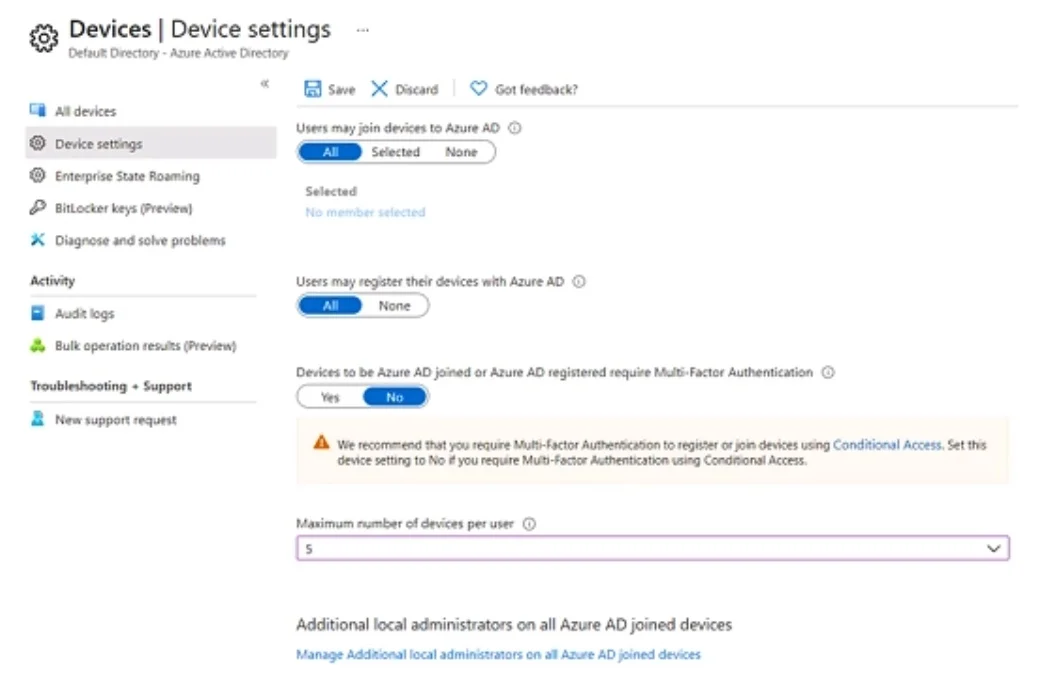
Hotspot Question You have a Microsoft Entra tenant that has a Microsoft Entra ID P2 service plan. The tenant contains the users shown in the following table. You have the Device settings shown in…
The correct answer is User1 can join four additional Windows 10 devices to Microsoft Entra ID. = No; Admin1 can set Devices to be Microsoft Entra joined or Microsoft Entra registered require Multi-Factor Authentication to Yes. = Yes; Admin2 is a local administrator on Device3. = Yes. This question tests knowledge of Microsoft Entra ID device registration, Azure AD Join, and how device settings (like maximum number of devices and who can join devices) affect users' ability to register or join devices to the tenant.
Question
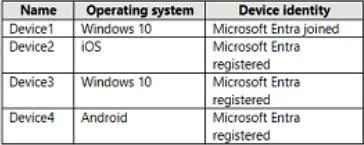
Hotspot Question You have a Microsoft Entra tenant that has a Microsoft Entra ID P2 service plan. The tenant contains the users shown in the following table. You have the Device settings shown in the following exhibit. User1 has the devices shown in the following table. For each of the following statements, select Yes if the statement is true. Otherwise. select No. NOTE: Each correct selection is worth one point. Answer:
Exhibits
Answer Area
- User1 can join four additional Windows 10 devices to Microsoft Entra ID.No
- Admin1 can set Devices to be Microsoft Entra joined or Microsoft Entra registered require Multi-Factor Authentication to Yes.Yes
- Admin2 is a local administrator on Device3.Yes
Explanation
This question tests knowledge of Microsoft Entra ID device registration, Azure AD Join, and how device settings (like maximum number of devices and who can join devices) affect users' ability to register or join devices to the tenant.
Approach. To answer each statement correctly, you must cross-reference the Device Settings exhibit (which typically shows: Users may join devices to Azure AD, Maximum number of devices per user, and Require Multi-Factor Authentication to join devices) with each user's role/group membership and User1's existing device count. For example, if the maximum devices per user is set to 5 and User1 already has 5 devices, User1 cannot register an additional device. If 'Users may join devices' is set to 'Selected' and only a specific group can join, users outside that group cannot join new devices. If MFA is required to join devices, users without MFA capability will be blocked. Each statement must be evaluated by checking: (1) whether the user is allowed to join/register devices per the policy, (2) whether the user has reached the device limit, and (3) whether any MFA or Entra ID P2 conditional requirements apply. Without the exact table values and exhibit numbers, the general rule is: a user CAN register/join a device only if they are in the permitted group, have not exceeded the device limit, and meet any MFA requirements; otherwise the answer is No.
Concept tested. Microsoft Entra ID (Azure AD) Device Settings - specifically, how 'Users may join devices to Azure AD' (All/Selected/None), 'Maximum number of devices per user', and 'Require MFA to join devices' settings interact with individual user device counts and group memberships to determine whether a user can register, join, or add additional devices to the tenant.
Reference. https://learn.microsoft.com/en-us/entra/identity/devices/device-management-azure-portal
Topics
Community Discussion
No community discussion yet for this question.