
PL-900 · Question #289
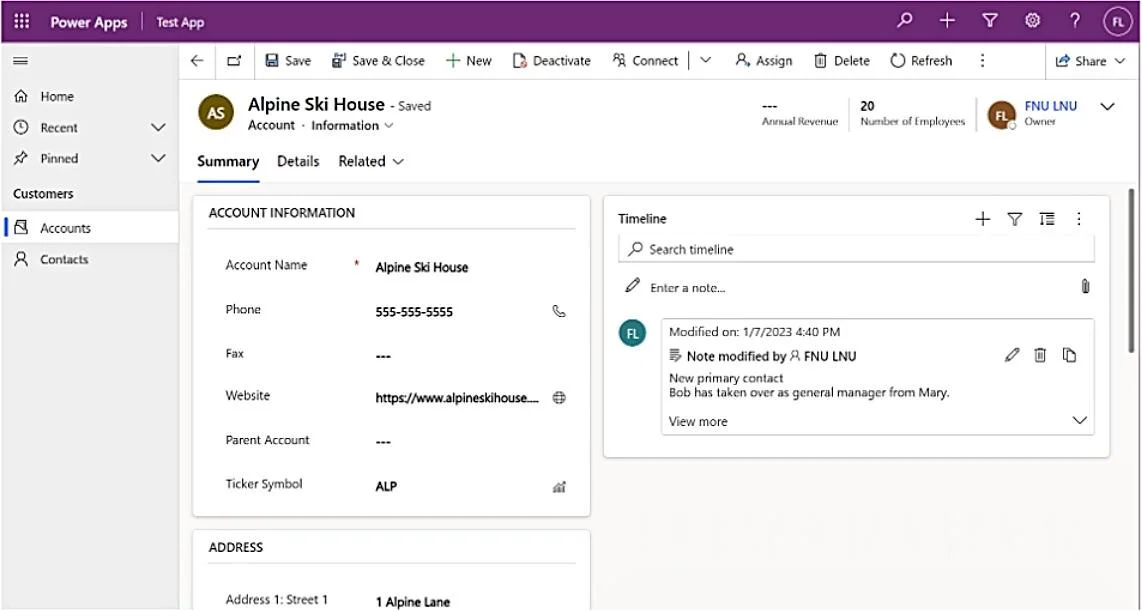
A user requests the removal of the Fax column from the following form in a model-driven app: Which form should you open in the app designer?
The correct answer is A. Account. To remove a column from a form in a model-driven app, you must identify the primary table (entity) associated with that form, then open the specific form in the app designer for that table.
Question
Exhibit
Options
- AAccount
- BInformation
- CSummary
- DAlpine Ski House
How the community answered
(51 responses)- A71% (36)
- B18% (9)
- C8% (4)
- D4% (2)
Why each option
To remove a column from a form in a model-driven app, you must identify the primary table (entity) associated with that form, then open the specific form in the app designer for that table.
In model-driven apps, forms are tied to specific tables (entities); therefore, to modify a form, you must open the relevant entity's form, which in this case is the Account entity.
"Information" is a common name for a form (e.g., "Account Information Form") within an entity, not the entity itself that you would select to modify the form.
"Summary" is a common name for a form within an entity, representing a specific layout or view, not the underlying entity.
"Alpine Ski House" is likely the name of a record (e.g., an Account name) displayed on the form, not the form definition or the entity associated with the form.
Concept tested: Model-driven app form customization
Source: https://learn.microsoft.com/en-us/power-apps/maker/model-driven-apps/create-design-forms
Community Discussion
No community discussion yet for this question.