
PL-600 · Question #32
You are designing a Power Platform solution. During quality assurance testing the API limits are reached. You need to identify and resolve the issue. Which two actions should you recommend? Each…
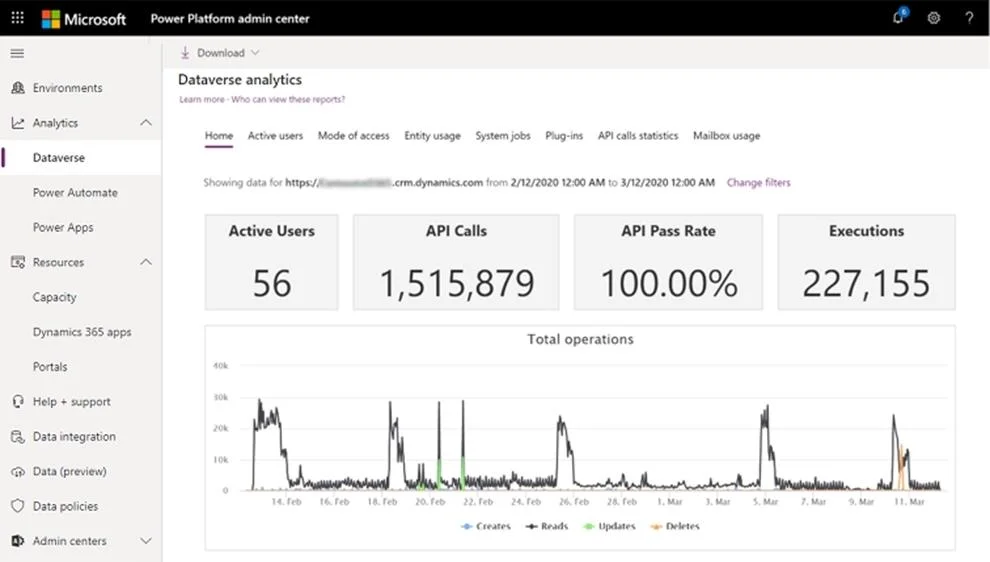
The correct answer is A. Allocate Microsoft Dataverse capacity add-on subscriptions. C. Review the Home tab Dataverse analytics dashboard. A: When users exceed their limits, administrators can see this in the admin center (see below). You can do either one of the following: Adjust the app or flow to use fewer API requests Purchase the Power Apps and Power Automate capacity add-on for your organization C: Home…
Question
Exhibit
Options
- AAllocate Microsoft Dataverse capacity add-on subscriptions.
- BUse the out-of-the-box User Summary report from the Reports section of the solution's model-
- CReview the Home tab Dataverse analytics dashboard.
- DIn the Power Platform admin center, review the Usage section of the Power Apps analytics
- EIn the Power Platform admin center, review the Runs section of the Power Automate analytics
How the community answered
(66 responses)- A73% (48)
- B5% (3)
- D8% (5)
- E15% (10)
Explanation
A: When users exceed their limits, administrators can see this in the admin center (see below). You can do either one of the following: Adjust the app or flow to use fewer API requests Purchase the Power Apps and Power Automate capacity add-on for your organization C: Home (default) Dashboard. This is the default dashboard that provides information on the number of active Dataverse users, storage usage, the most active workflows, and more. API Calls: API Calls Number of API calls that were made by the Dataverse environment for the selected time period. https://docs.microsoft.com/en-us/power-platform/admin/api-request-limits-allocations https://docs.microsoft.com/en-us/power-platform/admin/analytics-common-data-service
Topics
Community Discussion
No community discussion yet for this question.