
PL-600 · Question #140
You are designing forms for a Microsoft Power Platform solution. Each person must see only the columns required for their department. You need to ensure that the forms open correctly, display only…
The correct answer is C. Create one form for each department. Add only columns needed on the form for each. To ensure users see only department-relevant columns and facilitate quick data entry in forms, create a separate form for each department containing only the necessary fields.
Question
Exhibit
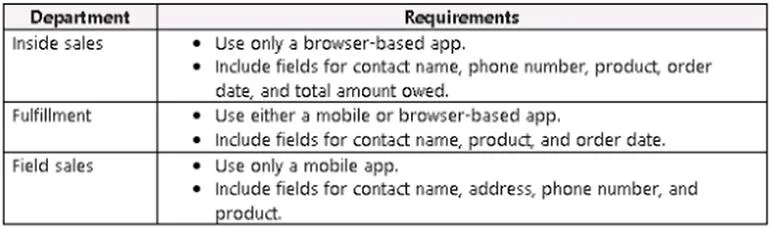
Options
- ACreate one form for each department. Add all columns needed for all departments. Use business
- BCreate a shared form for all departments. Add all the columns. Add column-level security to
- CCreate one form for each department. Add only columns needed on the form for each
- DAdd new columns to an existing form. Grant all departments security roles for that form.
How the community answered
(57 responses)- A4% (2)
- B12% (7)
- C79% (45)
- D5% (3)
Why each option
To ensure users see only department-relevant columns and facilitate quick data entry in forms, create a separate form for each department containing only the necessary fields.
Adding all columns to each form, even with business rules to hide them, still means the form processes and contains unnecessary elements, potentially impacting performance and user experience.
Using column-level security on a shared form hides fields from unauthorized users but does not remove them from the form's underlying structure, which can still lead to slower load times compared to dedicated forms.
Creating a distinct form for each department with only the required columns ensures users view a clean, relevant interface, which improves data entry speed and form loading times by rendering fewer unnecessary fields.
Adding new columns to an existing form and granting security roles does not inherently restrict column visibility by department without additional, complex logic or separate forms.
Concept tested: Form design for role-based field visibility
Source: https://learn.microsoft.com/en-us/power-apps/maker/model-driven-apps/create-design-forms
Topics
Community Discussion
No community discussion yet for this question.