
PL-500 · Question #131
Drag and Drop Question A company is using SAP in a data center. The SAP environment uses the default configuration. The company plans to automate the creation of vendors in SAP after data is…
The correct answer is Create an automated cloud flow; Configure an SAP ERP connection; Configure an on-premises data gateway; Add a Call SAP function (V2) action; Record steps in SAP. To automate on-premises SAP vendor creation from a SharePoint approval, establish on-premises connectivity, configure the SAP connection, define an automated cloud flow, and integrate the SAP function call within the flow.
Question
Drag and Drop Question A company is using SAP in a data center. The SAP environment uses the default configuration. The company plans to automate the creation of vendors in SAP after data is approved in a SharePoint list. You need to recommend a solution for the automation. Which four actions should you perform in sequence? To answer, move the appropriate actions from the list of actions to the answer area and arrange them in the correct order. NOTE: More than one order of answer choices is correct. You will receive credit for any of the correct orders you select. Answer:
Exhibit
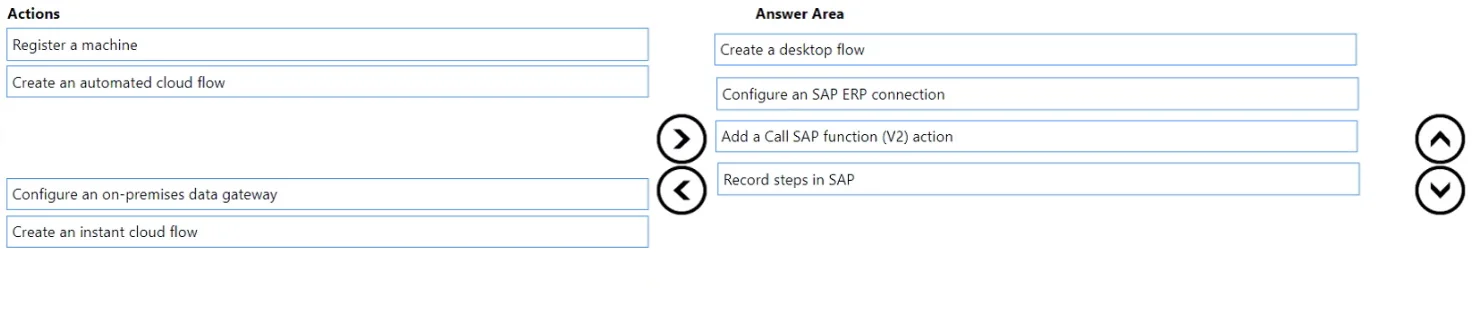
Answer Area
Drag items
Correct arrangement
- Create an automated cloud flow
- Configure an SAP ERP connection
- Configure an on-premises data gateway
- Add a Call SAP function (V2) action
- Record steps in SAP
Explanation
To automate on-premises SAP vendor creation from a SharePoint approval, establish on-premises connectivity, configure the SAP connection, define an automated cloud flow, and integrate the SAP function call within the flow.
Approach. The goal is to automate an on-premises SAP system from a cloud service (SharePoint) using Power Automate. This requires establishing connectivity to the on-premises resource, configuring the specific connection to SAP, defining the cloud-based workflow, and then implementing the action to interact with SAP. The four correct actions, and their most logical sequence, are:
-
Configure an on-premises data gateway: SAP is in a data center, meaning it's an on-premises resource. Power Automate, a cloud service, requires an on-premises data gateway to securely connect to and communicate with resources within the local network where SAP resides. This is the foundational step for any cloud-to-on-premises integration.
-
Configure an SAP ERP connection: Once the data gateway is in place, a specific connection to the SAP system needs to be configured in Power Automate. This connection uses the gateway to authenticate and establish a session with SAP, allowing Power Automate to send and receive data from the SAP system.
-
Create an automated cloud flow: The requirement states 'automate the creation of vendors in SAP after data is approved in a SharePoint list'. This implies an event-driven automation. An automated cloud flow is designed to start when a specific event occurs (e.g., an item is approved in a SharePoint list), making it the correct type of flow for this scenario.
-
Add a Call SAP function (V2) action: Within the automated cloud flow, after the SharePoint approval trigger, the action to create the vendor in SAP needs to be performed. The 'Call SAP function (V2)' action, part of the SAP ERP connector, is used to invoke BAPIs (Business Application Programming Interfaces) or RFCs (Remote Function Calls) in SAP, which are the standard API methods for integrating with SAP systems to perform operations like vendor creation. This action utilizes the SAP ERP connection configured previously.
An alternative valid order, as specified by the question note 'More than one order of answer choices is correct', could be:
- Configure an on-premises data gateway
- Create an automated cloud flow
- Configure an SAP ERP connection
- Add a Call SAP function (V2) action This order is also valid because while you start creating the automated cloud flow, the system would guide you to configure the SAP ERP connection (which depends on the gateway) before you can successfully add and configure the 'Call SAP function' action within the flow.
Common mistakes.
-
common_mistake. Common mistakes include choosing actions related to UI automation (RPA) instead of API-based integration, selecting the wrong type of Power Automate flow, or incorrectly sequencing the chosen actions.
-
Choosing 'Create a desktop flow' or 'Record steps in SAP': These actions are for UI automation (RPA), which simulates user interaction with the SAP GUI. While possible, API-based integration using the SAP ERP connector and its 'Call SAP function (V2)' action is generally preferred for robustness, performance, and maintainability, especially when the 'default configuration' implies available BAPIs/RFMs. Using both UI automation and API integration for the same core task is redundant.
-
Choosing 'Register a machine': This action is a prerequisite for running desktop flows (UI automation). Since the recommended solution leverages the SAP ERP connector for API integration, registering a machine is not directly required for the SAP interaction itself.
-
Choosing 'Create an instant cloud flow': Instant flows are manually triggered by a user. The scenario explicitly states 'after data is approved in a SharePoint list,' which requires an event-driven, automated trigger, making 'Create an automated cloud flow' the correct choice.
-
Incorrect Sequencing (e.g., placing 'Configure an SAP ERP connection' before 'Configure an on-premises data gateway'): The on-premises data gateway provides the fundamental network connectivity. Without the gateway, the cloud service cannot reach the on-premises network to establish the SAP ERP connection. Similarly, the 'Add a Call SAP function (V2) action' must come after the flow and connection are defined, as it's an action executed within the flow using that connection.
Concept tested. Power Automate integration with on-premises systems, specifically SAP, covering on-premises data gateway functionality, SAP ERP connector usage (BAPIs/RFMs), automated cloud flow design, and the logical sequence of setting up enterprise automation workflows.
Topics
Community Discussion
No community discussion yet for this question.