
PL-300 · Question #68
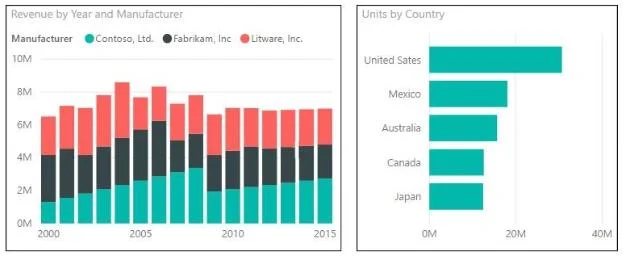
You are creating a report in Power BI Desktop that has two visualizations on a page as shown in the following exhibit. You need to ensure that when you click the bar of a country, only the values…
The correct answer is C. Click the Units by Country chart. On the Format tab, click Edit Interactions. On the Revenue by. To control how clicking a visual affects another visual, you must first select the SOURCE visual (the one being clicked-Units by Country), then use Format > Edit Interactions to configure what the TARGET visual (Revenue by Year and Manufacturer) does. Setting the target to…
Question
You are creating a report in Power BI Desktop that has two visualizations on a page as shown in the following exhibit. You need to ensure that when you click the bar of a country, only the values for that country are shown on the Revenue by Year and Manufacturer chart.
Exhibit
Options
- AClick the Revenue by Year and Manufacturer chart. On the Format tab, click Edit Interactions. On
- BClick the Revenue by Year and Manufacturer chart. On the Format tab, click Edit Interactions. On
- CClick the Units by Country chart. On the Format tab, click Edit Interactions. On the Revenue by
- DClick the Units by Country chart. On the Format tab, click Edit Interactions. On the Revenue by
How the community answered
(29 responses)- A10% (3)
- B3% (1)
- C83% (24)
- D3% (1)
Explanation
To control how clicking a visual affects another visual, you must first select the SOURCE visual (the one being clicked-Units by Country), then use Format > Edit Interactions to configure what the TARGET visual (Revenue by Year and Manufacturer) does. Setting the target to 'Filter' ensures only data for the clicked country is shown. Selecting the target visual first (options A/B) and editing interactions from there configures the wrong direction.
Topics
Community Discussion
No community discussion yet for this question.