
PL-300 · Question #255
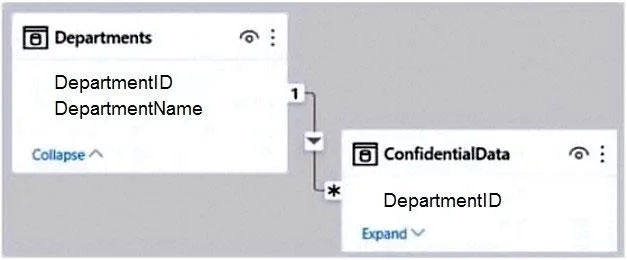
You have the Power Bl model shown in the following exhibit. There are four departments in the Departments table. You need to ensure that users can see the data of their respective department only…
The correct answer is A. Create a row-level security (RLS) role for each department, and then define the membership of. Row-level security (RLS) with Power BI can be used to restrict data access for given users. Filters restrict data access at the row level, and you can define filters within roles. https://docs.microsoft.com/en-us/power-bi/enterprise/service-admin-rls
Question
You have the Power Bl model shown in the following exhibit. There are four departments in the Departments table. You need to ensure that users can see the data of their respective department only. What should you do?
Exhibit
Options
- ACreate a row-level security (RLS) role for each department, and then define the membership of
- BCreate a DepartmentID parameter to filter the Departments table.
- CTo the ConfidentialData table, add a calculated measure that uses the currentgroup DAX
- DCreate a slicer that filters Departments based on DepartmentID.
How the community answered
(36 responses)- A83% (30)
- B6% (2)
- C3% (1)
- D8% (3)
Explanation
Row-level security (RLS) with Power BI can be used to restrict data access for given users. Filters restrict data access at the row level, and you can define filters within roles. https://docs.microsoft.com/en-us/power-bi/enterprise/service-admin-rls
Community Discussion
No community discussion yet for this question.