
PL-300 · Question #252
You have a Power Bl workspace that contains several reports. You need to provide a user with the ability to create a dashboard that will use the visuals from the reports. What should you do?
The correct answer is B. Add the user as a Viewer of the workspace. To grant access to a new workspace, assign those user groups or individuals to one of the workspace roles: Admin, Member, Contributor, or Viewer. Workspace roles - https://docs.microsoft.com/en-us/power-bi/collaborate-share/service-roles-new-workspaces
Question
You have a Power Bl workspace that contains several reports. You need to provide a user with the ability to create a dashboard that will use the visuals from the reports. What should you do?
Exhibit
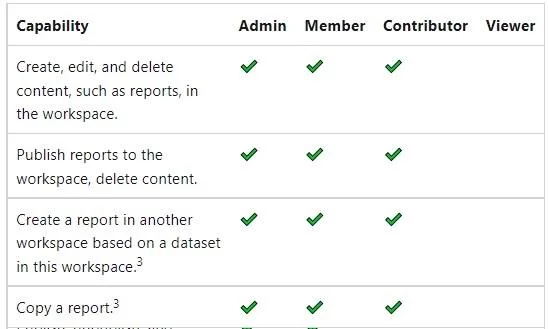
Options
- AGrant the Read permission for the datasets to the user.
- BAdd the user as a Viewer of the workspace.
- CShare the reports with the user.
- DCreate a row-level security (RLS) role and add the user to the role.
- EAdd the user as a member of the workspace.
How the community answered
(56 responses)- A2% (1)
- B70% (39)
- C7% (4)
- D5% (3)
- E16% (9)
Explanation
To grant access to a new workspace, assign those user groups or individuals to one of the workspace roles: Admin, Member, Contributor, or Viewer. Workspace roles - https://docs.microsoft.com/en-us/power-bi/collaborate-share/service-roles-new-workspaces
Community Discussion
No community discussion yet for this question.