
PL-300 · Question #186
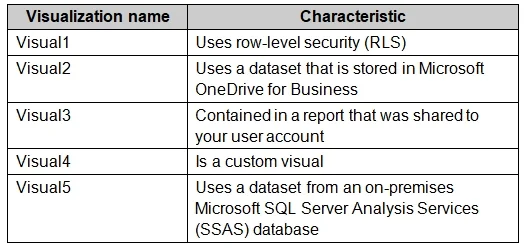
You plan to embed multiple visualization in a public website. Your Power BI infrastructure contains the visualizations configured as shown in the following table. Which two visualizations can you…
The correct answer is B. Visual2 D. Visual4. To embed visualizations into a public website, only Power BI reports explicitly configured for public web publishing are suitable.
Question
You plan to embed multiple visualization in a public website. Your Power BI infrastructure contains the visualizations configured as shown in the following table. Which two visualizations can you embed into the website? Each correct answer presents a complete the solution. NOTE: Each correct selection is worth one point.
Exhibit
Options
- AVisual1
- BVisual2
- CVisual3
- DVisual4
- EVisual5
How the community answered
(49 responses)- A8% (4)
- B73% (36)
- C4% (2)
- E14% (7)
Why each option
To embed visualizations into a public website, only Power BI reports explicitly configured for public web publishing are suitable.
If Visual1 is a dashboard, it cannot be embedded directly using Power BI's 'Publish to web' feature for public access, as this feature is report-specific.
Visual2, if configured as a report published to web (public), can be successfully embedded into a public website, allowing anonymous access to the visualization.
If Visual3 is a report but not enabled for 'Publish to web' or contains unsupported elements, it cannot be publicly embedded.
Visual4, similarly to Visual2, if it is a report enabled for 'Publish to web (public)', allows for its secure and publicly accessible embedding within web pages.
If Visual5 is a dashboard, it cannot be embedded directly using Power BI's 'Publish to web' feature for public access, as this feature is report-specific.
Concept tested: Power BI Publish to web (public)
Source: https://learn.microsoft.com/power-bi/collaborate-share/service-publish-to-web
Topics
Community Discussion
No community discussion yet for this question.