
PL-200 · Question #351
Drag and Drop Question You are implementing a model-driven app for a company. The company requires the following implementation for the app: - When a user selects a button, a side pane must open…
The correct answer is Use the modern app designer.; Add a new custom page.; Create a canvas app.; Connect to SharePoint Online. The question tests the ability to sequence actions for implementing a low-code document upload side pane in a model-driven app using external SharePoint Online storage.
Question
Exhibit
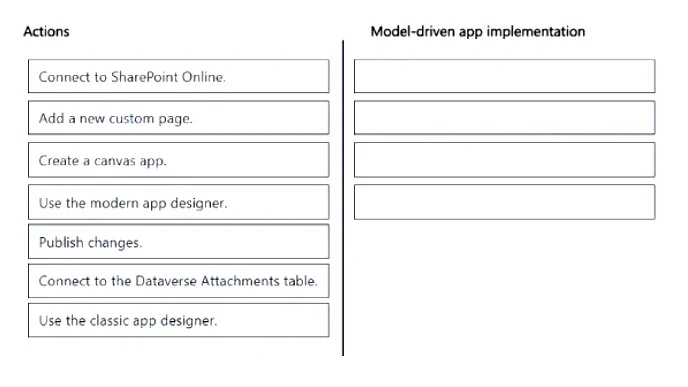
Answer Area
Drag items
Correct arrangement
- Use the modern app designer.
- Add a new custom page.
- Create a canvas app.
- Connect to SharePoint Online.
Explanation
The question tests the ability to sequence actions for implementing a low-code document upload side pane in a model-driven app using external SharePoint Online storage.
Approach. The correct approach, as depicted in the second exhibit image, involves dragging and dropping the following four actions into the answer area in this precise sequence to fulfill the requirements:
- Use the modern app designer: This is the initial and preferred environment for building and modifying model-driven apps, providing the tools necessary to add new components like custom pages.
- Add a new custom page: Custom pages are pivotal for integrating custom user interfaces and logic (like a document upload form) into a model-driven app, appearing as a side pane without requiring extensive custom coding.
- Create a canvas app: When adding a custom page, you either create a new Canvas app or embed an existing one. This Canvas app will contain the actual controls and logic for users to upload documents.
- Connect to SharePoint Online: To meet the requirement of storing documents in an 'external document management solution' while avoiding custom code, the Canvas app within the custom page must connect to SharePoint Online, which is the standard, low-code integration for external document storage in Power Apps and Dataverse environments.
Common mistakes.
- common_mistake. Common mistakes include selecting incorrect actions or placing the correct actions in the wrong order.
- 'Connect to the Dataverse Attachments table': This is incorrect because the requirement specifies an external document management solution. Storing documents in the Dataverse Attachments table keeps them within Dataverse, not externally.
- 'Use the classic app designer': This choice is wrong because the modern app designer is necessary for creating and configuring custom pages, which are fundamental to implementing the side pane functionality described. The classic designer does not support custom pages.
- 'Publish changes': While publishing is a crucial final step, the question asks for the four implementation actions to build the functionality, not the deployment step. It is not one of the core steps for creating the solution itself.
- Incorrect order: Even if the correct actions are chosen, an illogical sequence would prevent successful implementation. For example, attempting to 'Connect to SharePoint Online' before 'Creating a canvas app' is incorrect because the connection is made from within the Canvas app.
Concept tested. The core concept tested is the integration of Canvas apps as custom pages within model-driven apps to extend functionality, specifically for external document management via SharePoint Online, adhering to low-code development principles using the modern app designer.
Topics
Community Discussion
No community discussion yet for this question.