PL-200 · Question #326
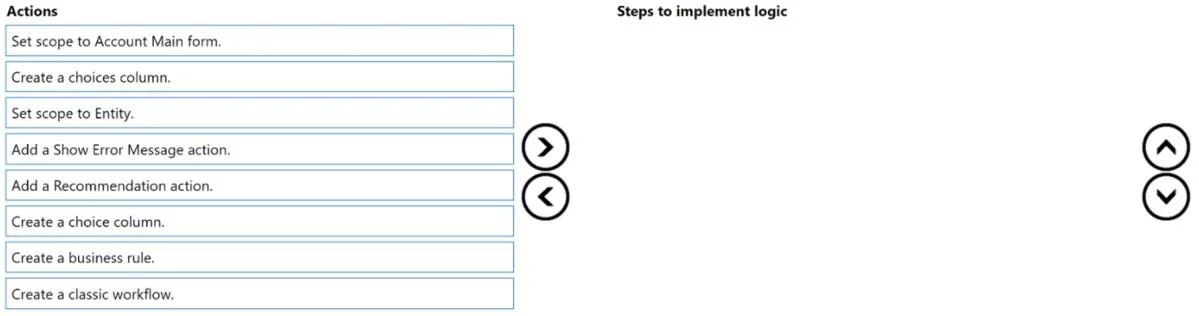
Drag and Drop Question A company is using the Account table and a main form named Account Main. The company defines the following requirements for the Account Main form: - Evaluate a single value sele
The correct answer is Create a choice column.; Create a business rule.; Set scope to Account Main form.; Add a Recommendation action.. To implement form-specific logic, create a choice column, then a business rule, set its scope to the specific form, and add a recommendation action as required by the business intelligence suggestion.
Question
Exhibit
Answer Area
Drag items
Correct arrangement
- Create a choice column.
- Create a business rule.
- Set scope to Account Main form.
- Add a Recommendation action.
Explanation
To implement form-specific logic, create a choice column, then a business rule, set its scope to the specific form, and add a recommendation action as required by the business intelligence suggestion.
Approach. The core problem is to implement form-specific logic that evaluates a single-value drop-down list and displays a message and a suggestion. This is best achieved using Business Rules in Microsoft Power Apps or Dynamics 365.
Here's the correct sequence and reasoning:
-
Create a choice column. The requirement states 'evaluate a single value selected as part of a drop-down list'. A 'choice' column (picklist/option set) is designed for single-selection drop-downs, making it the appropriate data structure. 'Choices' columns are for multi-select.
-
Create a business rule. Business rules are the no-code solution for implementing conditional logic, validations, error messages, and recommendations directly on forms. They are ideal for the requirements stated.
-
Set scope to Account Main form. The requirement explicitly states, 'Logic must run against this form only'. Setting the business rule's scope to 'Form' and then selecting 'Account Main form' ensures the rule applies only to that specific form, not all forms for the entity.
-
Add a Recommendation action. The requirement specifies displaying 'a message and suggestion based on business intelligence'. A Recommendation action is one of the specific actions available within a business rule to provide such suggestions. While 'Add a Show Error Message action' is also required by the problem statement, the question asks for four sequential steps, and this action represents implementing one of the specific required outcomes of the business rule. The exam note states that multiple orders can be correct, suggesting flexibility for the final action if both are valid within the rule. The provided solution shows 'Add a Recommendation action' as the fourth step.
Common mistakes.
-
common_mistake. Common mistakes include selecting the wrong type of column, using an incorrect tool for the logic, setting the wrong scope, or choosing actions that are not part of the sequential implementation process:
-
'Create a choices column': Incorrect because the requirement is to 'evaluate a single value', which corresponds to a 'choice' (single-select) column, not 'choices' (multi-select).
-
'Set scope to Entity': Incorrect because the requirement is 'Logic must run against this form only'. Setting the scope to the entity would apply the rule to all forms for that entity, violating the requirement.
-
'Create a classic workflow': Incorrect because classic workflows are typically for server-side or background processes, or more complex multi-step automation. Business rules are specifically designed for real-time, client-side form validation, conditional logic, and displaying messages/recommendations.
-
Incorrect ordering: For instance, trying to 'Set scope to Account Main form' or 'Add a Recommendation action' before 'Create a business rule' would be incorrect, as these are configuration steps performed within a business rule after it has been created. Similarly, creating the column is usually a prerequisite for defining a rule that depends on it.
Concept tested. The underlying technical concept being tested is the implementation of client-side business logic and validation in Microsoft Dynamics 365 or Power Apps using Business Rules. This includes understanding column types ('choice' vs. 'choices'), the purpose and scope of Business Rules, and the various actions available within a Business Rule (e.g., Show Error Message, Recommendation).
Topics
Community Discussion
No community discussion yet for this question.