PL-200 · Question #278
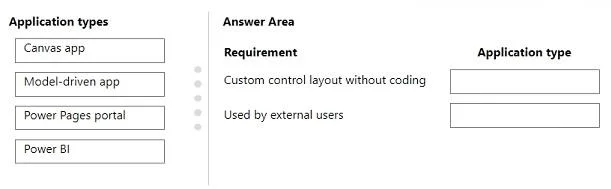
Drag and Drop Question A company plans to create two Microsoft Power Platform applications. One of the applications requires a custom control layout without using code. The other application will be…
The correct answer is Canvas app; Power Pages portal. This question assesses the test-taker's understanding of different Microsoft Power Platform application types and their suitability for specific business requirements, such as custom UI design and external user access.
Question
Exhibit
Answer Area
Drag items
Correct arrangement
- Canvas app
- Power Pages portal
Explanation
This question assesses the test-taker's understanding of different Microsoft Power Platform application types and their suitability for specific business requirements, such as custom UI design and external user access.
Approach. To answer correctly, drag 'Canvas app' to the 'Custom control layout without coding' requirement and 'Power Pages portal' to the 'Used by external users' requirement.
- 'Custom control layout without coding' should be matched with 'Canvas app': Canvas apps provide a blank 'canvas' where users can design highly customized user interfaces with pixel-perfect control, dragging and dropping various controls and components to create a unique look and feel without writing traditional code. They offer the most flexibility in terms of UI design.
- 'Used by external users' should be matched with 'Power Pages portal': Power Pages (formerly Power Apps portals) are specifically designed to create external-facing websites that allow users outside an organization (including anonymous users or authenticated external users) to interact with data from Microsoft Dataverse. They are the primary solution within the Power Platform for building secure, low-code websites for external audiences.
Common mistakes.
- common_mistake. - Using 'Model-driven app' for 'Custom control layout without coding': Model-driven apps are built around data in Microsoft Dataverse, and their UI is largely determined by the data model and pre-built components like forms, views, and dashboards. While some customization is possible, they do not offer the same level of granular, pixel-perfect control over the layout as Canvas apps. Their design is more prescriptive and less about free-form custom control placement.
- Using 'Model-driven app' for 'Used by external users': Model-driven apps are primarily intended for internal organizational users and require appropriate Power Apps licenses for access. They are not designed for public-facing websites or broad external user access. External users would typically access data through Power Pages.
- Using 'Power BI' for either requirement: Power BI is a business intelligence service for data visualization, reporting, and dashboarding. It is not an application development platform for creating interactive applications with custom layouts or for facilitating external user interaction in the way Power Apps or Power Pages do. It is purely for data analysis and presentation.
Concept tested. Microsoft Power Platform application types, including Canvas apps, Model-driven apps, and Power Pages (portals), and their specific use cases, design philosophies (e.g., UI flexibility), and target audiences (internal vs. external users).
Topics
Community Discussion
No community discussion yet for this question.