
PL-200 · Question #267
Drag and Drop Question A company uses a model-driven app with Microsoft Dataverse in a single environment. The company requires a canvas app that includes the same data as the model-driven app. You…
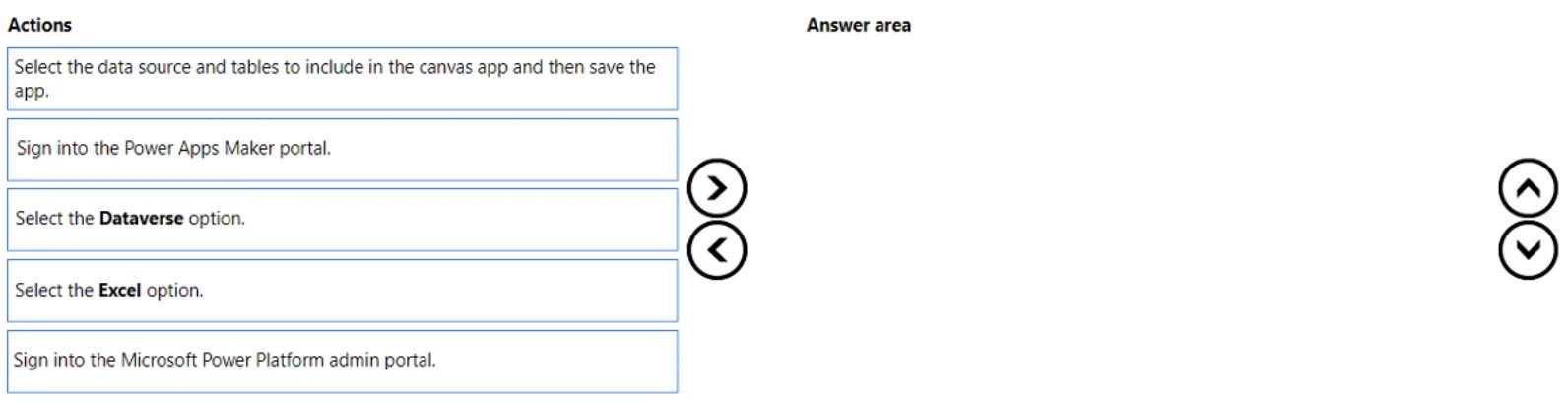
The correct answer is Sign into the Power Apps Maker portal.; Select the Dataverse option.; Select the data source and tables to include in the canvas app and then save the app. To create a canvas app that uses existing Dataverse data from a model-driven app, the user must sign into the Power Apps Maker portal, select Dataverse as the data source, and then choose the relevant tables before saving the app.
Question
Exhibit
Answer Area
Drag items
Correct arrangement
- Sign into the Power Apps Maker portal.
- Select the Dataverse option.
- Select the data source and tables to include in the canvas app and then save the app.
Explanation
To create a canvas app that uses existing Dataverse data from a model-driven app, the user must sign into the Power Apps Maker portal, select Dataverse as the data source, and then choose the relevant tables before saving the app.
Approach. The scenario requires creating a canvas app that connects to the same Dataverse data used by an existing model-driven app. The correct three actions, in sequence, are:
-
Sign into the Power Apps Maker portal. - This is the primary portal (make.powerapps.com) where users go to create, edit, and manage Power Apps, including canvas apps. This is the essential first step to begin app creation.
-
Select the Dataverse option. - Once in the Power Apps Maker portal, when creating a new app, the system prompts for the data source. Since the requirement is to use data from Dataverse (which is where the model-driven app's data resides), 'Dataverse' must be chosen as the data source type.
-
Select the data source and tables to include in the canvas app and then save the app. - After selecting 'Dataverse' as the connection, the next logical step is to specify which particular tables (data sources) from Dataverse should be included in the app. Once the desired tables are selected and configured, the app creation process is completed by saving it. These three steps form a complete and logical sequence for creating a canvas app from Dataverse.
Common mistakes.
- common_mistake. 1. 'Select the Excel option.' is incorrect because the scenario explicitly states the data is in Microsoft Dataverse, not Excel. Choosing Excel would connect to the wrong data source.
- 'Sign into the Microsoft Power Platform admin portal.' is incorrect because the Power Platform admin portal (admin.powerplatform.microsoft.com) is used for administrative tasks such as managing environments, users, and data policies, not for creating individual applications. App creation happens in the Power Apps Maker portal.
- Incorrect sequence of the correct actions: Even if the correct three actions are chosen, placing them in the wrong order would prevent successful app creation. For example, selecting Dataverse before signing into the Maker portal is not possible, and selecting specific tables before indicating Dataverse as the overall data source is illogical.
Concept tested. Creating canvas apps, connecting canvas apps to Microsoft Dataverse, understanding the purpose of the Power Apps Maker portal, and distinguishing between different data sources and Power Platform portals.
Topics
Community Discussion
No community discussion yet for this question.