Case Study 1 - Wide World Importers Background Overview Wide World Importers is an importer and supplier of fair trade, handmade home goods to independent retailers in North America. The company has…
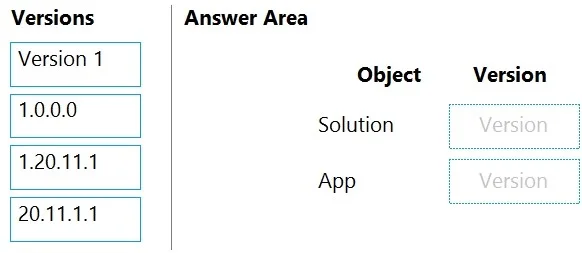
The correct interaction is to assign '20.11.1.1' to the Solution and 'Version 1' to the App, reflecting standard Power Platform versioning practices for solutions and individual applications, especially when deploying across tenants.
Design and manage business solutions
Question
Case Study 1 - Wide World Importers Background Overview Wide World Importers is an importer and supplier of fair trade, handmade home goods to independent retailers in North America. The company has a partner company named Tailwind Traders. One of the products that the company manufactures was recently featured on several major television talk shows and has become very popular. Wide World Importers is expanding their prospective sales operations to new markets and plans to engage current customers in a more direct manner. Current environment Sales representatives submit weekly status reports to regional managers. There is no standardized format for these status reports. The process for managing status reports is challenging. Wide World Importers has decided to use Microsoft 365, Microsoft Azure, and Power Platform for future app development. Both Wide World Importers and Tailwind Traders have identical Microsoft SharePoint and Azure configurations. Both companies use separate tenants. Requirements Application You must create a mobile app to streamline the creation of status reports by sales representatives. You must make the same app available to Tailwind Traders. The mobile app must meet the following requirements: Minimize the use of code. Use formulas and expressions when necessary. Support a variety of visual layouts. Use a SharePoint list to store information about regional managers and sales representatives. Use Azure SQL Database to store other data. Status reports Sales representatives must provide a weekly status report for all work processes each Monday. Representatives must enter the following information for each process: If a sales representative submits a status report and assigns the At Risk status to a process, the app must prompt the sales representative to enter a detailed description for the risk. This information must be emailed to the regional manager. If the category is Work/life balance, the information must be carbon copied to the human resources department. If a sales representative does not submit a weekly status report by an agreed upon deadline, the system must send an email to remind the sales representative. The app must be able to run both online and offline. If the mobile device on which the app runs is connected to the internet, the app must immediately submit the status report. You must display a visual indicator in the app so that sales representatives know whether the app is offline before submitting reports. When data is submitted offline, the data must be stored in the app until the app is back online. Technical Regardless of the UI layouts, the data recorded must be standardized in the Azure DB tables. You must use global variables in the app. Deployment Before deploying the app to production, you must ensure that the app conforms to Microsoft accessibility and performance guidelines. The completed app and all supporting components must be provided to Tailwind Traders. Tailwind Traders must not be able to make changes to any of the components. You must use the following version control numbering scheme: Major: The last two digits of the year the app is packaged Minor: Two digits that represent the month when the app is packaged Build: A number that is incremented to represent significant changes to the app Revision: The incremented revision for a package New versions of the application must completely replace previous versions of the app. When identifying versions of the app solution, all dependencies, entities, and user interfaces components must be identified to avoid any unintentional issues caused by reverting individual components to a previous version. Previous versions of the mobile app must be available for roll back purposes. All versions of software that have been used in production must be retained for five years. Issues The mobile app has been live for several months. Eight versions of the app have been released since the initial version of the app was deployed to sales representatives. You must revert the app to an earlier version and redesign some features. User1 often works in a warehouse that does not have internet connectivity. User1 needs to edit an existing status report and submit a new status report. Several sales representatives have accessibility restrictions. User2 is visually impaired and cannot see images. User3 is unable to use a mouse. Drag and Drop Question You publish the first version of the app and solution on November 1, 2020. You need to create the version numbers for the app and the solution. Which version numbers should you use? To answer, select the appropriate options in the answer area. NOTE: Each correct selection is worth one point Answer:
Exhibit
Answer Area
Drag items
Version 11.0.0.01.20.11.120.11.1.1
Explanation
The correct interaction is to assign '20.11.1.1' to the Solution and 'Version 1' to the App, reflecting standard Power Platform versioning practices for solutions and individual applications, especially when deploying across tenants.
Approach. Drag '20.11.1.1' from the 'Versions' list to the 'Solution Version' target in the 'Answer Area'. Drag 'Version 1' from the 'Versions' list to the 'App Version' target in the 'Answer Area'. Power Platform solutions, which are containers for packaging and deploying applications and components, adhere to a semantic versioning scheme (Major.Minor.Build.Revision), best represented by versions like '20.11.1.1'. Solutions are essential for the scenario's requirement to share the app with Tailwind Traders in a separate tenant, as they facilitate Application Lifecycle Management (ALM) including deployment across environments and tenants. Individual apps, such as the mobile app described, typically use simpler versioning labels that are more user-friendly or represent major published iterations, such as 'Version 1'. While apps also have internal build numbers, 'Version 1' is a common way to refer to a specific published iteration of an application, distinguishing it from the more formal semantic versioning of the containing solution.
Common mistakes.
common_mistake. Assigning 'Version 1' to the Solution and '20.11.1.1' to the App is incorrect because solutions demand semantic versioning for ALM, while apps typically present simpler, descriptive version names. Using an older semantic version like '1.0.0.0' or '1.20.11.1' for the Solution would imply deploying an outdated version, which is generally not the goal when a higher version ('20.11.1.1') is available. A fundamental misunderstanding would be to not associate the App with a Solution, as Solutions are critical for cross-tenant deployment and ALM in Power Platform.
Concept tested. Application Lifecycle Management (ALM) in Power Platform, specifically understanding the role, purpose, and versioning conventions for Solutions and individual Power Apps (Canvas/Model-driven apps). It also tests knowledge of best practices for deploying applications between different environments or tenants.