Question
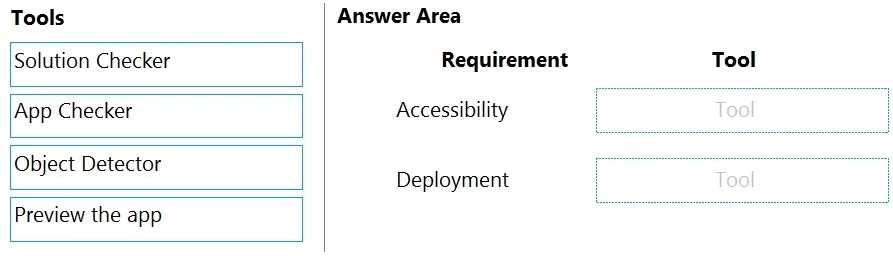
Case Study 1 - Wide World Importers Background Overview Wide World Importers is an importer and supplier of fair trade, handmade home goods to independent retailers in North America. The company has a partner company named Tailwind Traders. One of the products that the company manufactures was recently featured on several major television talk shows and has become very popular. Wide World Importers is expanding their prospective sales operations to new markets and plans to engage current customers in a more direct manner. Current environment Sales representatives submit weekly status reports to regional managers. There is no standardized format for these status reports. The process for managing status reports is challenging. Wide World Importers has decided to use Microsoft 365, Microsoft Azure, and Power Platform for future app development. Both Wide World Importers and Tailwind Traders have identical Microsoft SharePoint and Azure configurations. Both companies use separate tenants. Requirements Application You must create a mobile app to streamline the creation of status reports by sales representatives. You must make the same app available to Tailwind Traders. The mobile app must meet the following requirements: Minimize the use of code. Use formulas and expressions when necessary. Support a variety of visual layouts. Use a SharePoint list to store information about regional managers and sales representatives. Use Azure SQL Database to store other data. Status reports Sales representatives must provide a weekly status report for all work processes each Monday. Representatives must enter the following information for each process: If a sales representative submits a status report and assigns the At Risk status to a process, the app must prompt the sales representative to enter a detailed description for the risk. This information must be emailed to the regional manager. If the category is Work/life balance, the information must be carbon copied to the human resources department. If a sales representative does not submit a weekly status report by an agreed upon deadline, the system must send an email to remind the sales representative. The app must be able to run both online and offline. If the mobile device on which the app runs is connected to the internet, the app must immediately submit the status report. You must display a visual indicator in the app so that sales representatives know whether the app is offline before submitting reports. When data is submitted offline, the data must be stored in the app until the app is back online. Technical Regardless of the UI layouts, the data recorded must be standardized in the Azure DB tables. You must use global variables in the app. Deployment Before deploying the app to production, you must ensure that the app conforms to Microsoft accessibility and performance guidelines. The completed app and all supporting components must be provided to Tailwind Traders. Tailwind Traders must not be able to make changes to any of the components. You must use the following version control numbering scheme: Major: The last two digits of the year the app is packaged Minor: Two digits that represent the month when the app is packaged Build: A number that is incremented to represent significant changes to the app Revision: The incremented revision for a package New versions of the application must completely replace previous versions of the app. When identifying versions of the app solution, all dependencies, entities, and user interfaces components must be identified to avoid any unintentional issues caused by reverting individual components to a previous version. Previous versions of the mobile app must be available for roll back purposes. All versions of software that have been used in production must be retained for five years. Issues The mobile app has been live for several months. Eight versions of the app have been released since the initial version of the app was deployed to sales representatives. You must revert the app to an earlier version and redesign some features. User1 often works in a warehouse that does not have internet connectivity. User1 needs to edit an existing status report and submit a new status report. Several sales representatives have accessibility restrictions. User2 is visually impaired and cannot see images. User3 is unable to use a mouse. Drag and Drop Question You need to ensure that the app can support the needs of User2 and User3, and meets the production deployment requirements. Which tools should you use? To answer, select the appropriate tool in the answer area. NOTE: Each correct selection is worth one point. Answer:
Explanation
This question requires matching Power Platform tools to specific development requirements, identifying App Checker for accessibility validation and Solution Checker for deployment readiness.
Approach. To correctly answer this question, the test-taker must understand the primary functions of each Power Platform tool listed. 'Accessibility' refers to ensuring the app is usable by people with disabilities. The 'App Checker' in Power Apps is specifically designed to identify errors, warnings, and performance issues, but critically, it also scans for accessibility problems within a canvas app, such as issues with screen reader compatibility, color contrast, and tab order. Therefore, 'App Checker' is the correct tool for 'Accessibility'. 'Deployment' refers to the process of packaging, validating, and distributing the app or solution to different environments or users. The 'Solution Checker' is a Power Apps and Power Automate tool that analyzes solutions (which bundle apps, flows, and other components) for best practices, reliability, security, and performance issues before they are exported and imported into new environments or tenants. Given the scenario mentions making the app available to a partner company (Tailwind Traders) in a separate tenant, deploying a solution package is implied, making 'Solution Checker' the appropriate tool for 'Deployment'.
Common mistakes.
- common_mistake. Selecting 'Object Detector' for either requirement is incorrect. Object Detector is an AI Builder model that helps recognize specified objects in images, which is a specific AI capability within an app, not a general tool for accessibility or deployment validation. Choosing 'Preview the app' for either requirement is also incorrect. 'Preview the app' is used during development to interact with the app as a user would, allowing the developer to test functionality and user experience. It does not perform automated checks for accessibility standards or prepare the solution for deployment.
Concept tested. The core concept tested is the understanding of Power Platform development best practices, quality assurance, and application lifecycle management (ALM) within Power Apps and Power Automate, specifically the purpose and utility of built-in testing and validation tools like App Checker and Solution Checker.