
PL-100 · Question #266
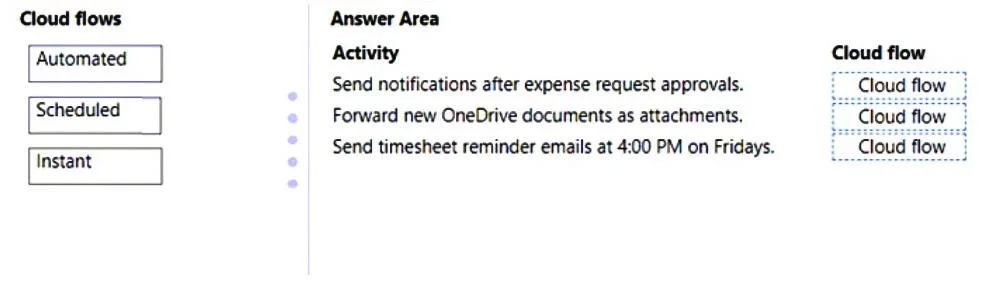
Drag and Drop Question A company uses Power Automate. The company requires three cloud flows for the following: - Send email notifications to a team member after an expense request is approved. - If…
The correct answer is Automated; Instant; Scheduled. This question tests the understanding of Power Automate cloud flow types - Automated, Scheduled, and Instant - and their appropriate use cases based on trigger mechanisms.
Question
Exhibit
Answer Area
Drag items
Correct arrangement
- Automated
- Instant
- Scheduled
Explanation
This question tests the understanding of Power Automate cloud flow types - Automated, Scheduled, and Instant - and their appropriate use cases based on trigger mechanisms.
Approach. The correct interaction is to drag 'Automated' to the first two activities and 'Scheduled' to the third.
- 'Send notifications after expense request approvals': This activity is triggered by an event - the approval of an expense request. An 'Automated' cloud flow is designed to run automatically when a specific event occurs.
- 'Forward new OneDrive documents as attachments': This activity is also triggered by an event - a new document being uploaded to OneDrive. Therefore, an 'Automated' cloud flow is the correct choice here as it responds to this file creation/modification event.
- 'Send timesheet reminder emails at 4:00 PM on Fridays': This activity needs to occur at a specific recurring time and day. A 'Scheduled' cloud flow is designed to run on a predefined schedule, such as daily, weekly, or monthly at a specific time.
Common mistakes.
- common_mistake. A common mistake would be to use 'Instant' for any of these scenarios. 'Instant' cloud flows (formerly 'Button flows') are designed to be triggered manually by a user, not by an event or on a schedule. None of the described activities require a manual trigger. For instance, using 'Instant' for the timesheet reminder would mean someone manually clicks a button every Friday at 4 PM, which is inefficient and not the intent of an automated reminder. Another mistake could be confusing 'Automated' with 'Scheduled' or vice versa. 'Automated' flows react to events (something happened), while 'Scheduled' flows react to time (it's now this time). For example, using 'Scheduled' for 'expense request approvals' would mean the flow runs at a set time regardless of whether an approval occurred, which is incorrect for an event-driven notification.
Concept tested. The core concept being tested is the understanding of Power Automate cloud flow types - Automated, Scheduled, and Instant - and their appropriate trigger mechanisms and use cases.
Topics
Community Discussion
No community discussion yet for this question.