
PL-100 · Question #215
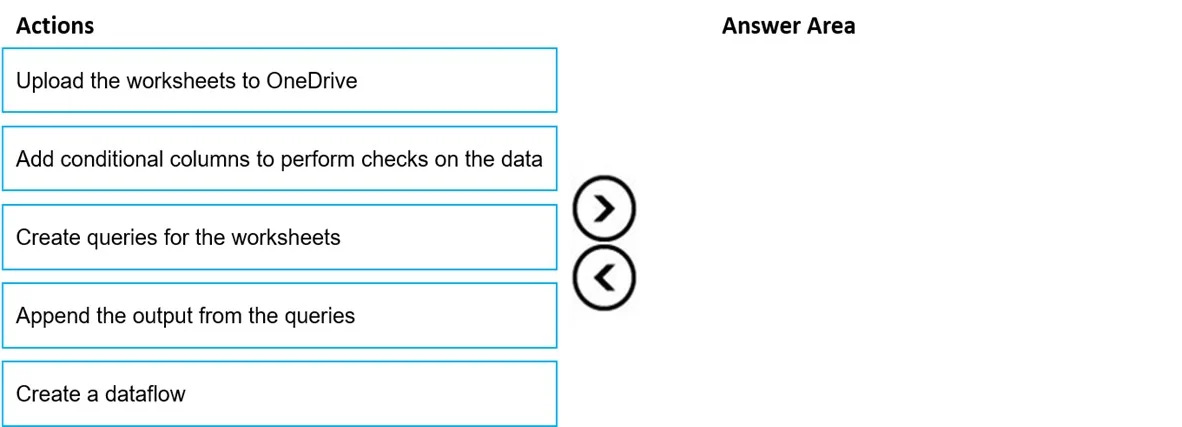
Drag and Drop Question You store data about products in two Microsoft Excel worksheets. The data contains duplicate rows. You need to consolidate data from the two worksheets into a Microsoft…
The correct answer is Upload the worksheets to OneDrive; Create a dataflow; Add conditional columns to perform checks on the data; Create queries for the worksheets; Append the output from the queries. To consolidate data from two Excel worksheets into a Dataverse table, first ensure data accessibility, then set up a dataflow, import data as queries, combine the queries, and finally apply transformations for data quality.
Question
Exhibit
Answer Area
Drag items
Correct arrangement
- Upload the worksheets to OneDrive
- Create a dataflow
- Add conditional columns to perform checks on the data
- Create queries for the worksheets
- Append the output from the queries
Explanation
To consolidate data from two Excel worksheets into a Dataverse table, first ensure data accessibility, then set up a dataflow, import data as queries, combine the queries, and finally apply transformations for data quality.
Approach. The correct order of actions is designed to follow a standard Extract, Transform, Load (ETL) process using Microsoft Dataflows (Power Query Online) to prepare data for Dataverse:
- Upload the worksheets to OneDrive: Before data can be imported into a cloud service like Dataverse via a dataflow, it must be accessible from a cloud source. OneDrive is a common and convenient location for Excel files.
- Create a dataflow: A dataflow is the container within Power Apps/Dataverse environments where you define your data ingestion and transformation logic. This is the starting point for the ETL process.
- Create queries for the worksheets: Within the dataflow, you connect to your data source (OneDrive) and create separate Power Query queries for each Excel worksheet, effectively 'extracting' the data.
- Append the output from the queries: Since the requirement is to 'consolidate data from the two worksheets', the most appropriate Power Query operation is to append the two queries into a single table. This combines the rows from both sources.
- Add conditional columns to perform checks on the data: After the data is combined (appended), transformation steps are applied to 'clean' and 'transform' the data, especially to address issues like 'duplicate rows' as mentioned in the scenario. While 'Remove Duplicates' is a direct method, 'Add conditional columns' represents a general data quality or transformation step that would typically occur here to further prepare the data before it is loaded into the Dataverse custom table (the implicit final step of a dataflow). This could involve flagging potential duplicates, creating unique keys, or performing other validations.
Common mistakes.
- common_mistake. A common mistake would be to misorder the Power Query steps. For instance, creating a dataflow is followed by creating queries within the dataflow. Actions like 'Add conditional columns' or 'Append the output' are transformation steps that must occur after the data has been queried and loaded into the Power Query editor. The order shown in the second exhibit image is incorrect because it places 'Add conditional columns' before 'Create queries for the worksheets' and 'Append the output from the queries', which is illogical. You cannot transform or combine data that has not yet been imported or queried into the dataflow.
Concept tested. Dataflows in Microsoft Power Apps/Dataverse, Power Query Online operations (data source connection, query creation, appending queries, data transformation using conditional columns), and the general Extract, Transform, Load (ETL) process for data integration and consolidation.
Topics
Community Discussion
No community discussion yet for this question.