
PL-100 · Question #110
Case Study 1 - Wide World Importers Background Overview Wide World Importers is an importer and supplier of fair trade, handmade home goods to independent retailers in North America. The company has…
This question tests knowledge of Power Apps control properties, specifically focusing on how AccessibleLabel and TabIndex contribute to an inclusive and accessible user experience.
Question
Exhibit
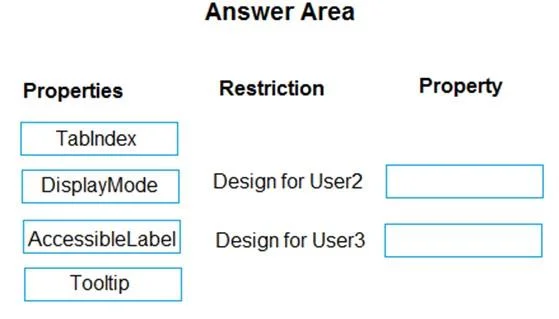
Answer Area
Explanation
This question tests knowledge of Power Apps control properties, specifically focusing on how AccessibleLabel and TabIndex contribute to an inclusive and accessible user experience.
Approach. The correct approach is to drag 'AccessibleLabel' to the 'Property' box corresponding to 'Design for User2' and 'TabIndex' to the 'Property' box corresponding to 'Design for User3'.- 'AccessibleLabel' is a key property for accessibility, especially for users who rely on screen readers (like 'User2' might). It provides a descriptive text label for controls, which is vital when the visual appearance alone is not sufficient for understanding a control's purpose.- 'TabIndex' is crucial for keyboard navigation (like 'User3' might prefer or require). It defines the sequential order in which controls receive focus when a user presses the Tab key. Setting TabIndex correctly ensures a logical and intuitive flow for users navigating an app without a mouse.
Common mistakes.
- common_mistake. Incorrectly choosing 'DisplayMode' or 'Tooltip' for these restrictions. 'DisplayMode' controls whether a control is editable, viewable, or disabled, which is important for overall user interaction but doesn't directly address specific accessibility needs (like screen readers) or keyboard navigation order. 'Tooltip' provides a small pop-up text on hover, which can be helpful but is not a primary accessibility feature for screen readers nor does it govern tab order. These properties are less directly aligned with 'Design for User2' (implying accessibility) and 'Design for User3' (implying keyboard navigation) compared to 'AccessibleLabel' and 'TabIndex' respectively.
Concept tested. Power Apps control properties, specifically 'AccessibleLabel' for screen reader accessibility and 'TabIndex' for keyboard navigation, emphasizing inclusive design principles.
Topics
Community Discussion
No community discussion yet for this question.