
PCCSE · Question #41
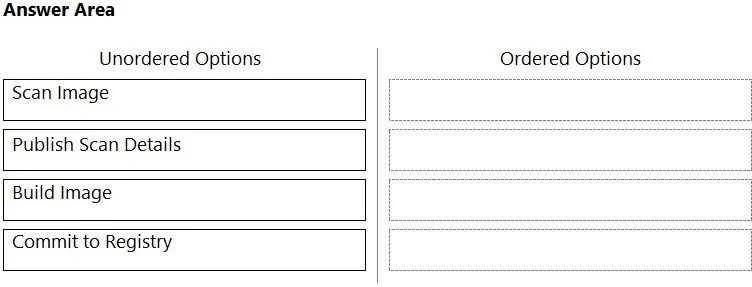
Drag and Drop Question What is the order of steps in a Jenkins pipeline scan? (Drag the steps into the correct order of occurrence, from the first step to the last.) Answer:
The correct answer is Scan Image; Publish Scan Details; Build Image; Commit to Registry. The correct order for a Jenkins pipeline scan involves building the image first, then scanning it, publishing the scan results, and finally committing the validated image to a registry.
Question
Drag and Drop Question What is the order of steps in a Jenkins pipeline scan? (Drag the steps into the correct order of occurrence, from the first step to the last.) Answer:
Exhibit
Answer Area
Drag items
Correct arrangement
- Scan Image
- Publish Scan Details
- Build Image
- Commit to Registry
Explanation
The correct order for a Jenkins pipeline scan involves building the image first, then scanning it, publishing the scan results, and finally committing the validated image to a registry.
Approach. To answer this question correctly, the test-taker must drag the unordered options into the 'Ordered Options' column in the sequence that reflects a typical Jenkins pipeline's image scanning process. The correct order is:
- Build Image: This is the fundamental first step. Before any analysis or deployment, the container image must be built from the source code and Dockerfile.
- Scan Image: Once the image is built, it's crucial to scan it for vulnerabilities, security misconfigurations, or policy violations. This step identifies potential issues within the image itself.
- Publish Scan Details: After the scan is completed, the results (e.g., vulnerability reports, compliance checks) need to be published or reported. This allows developers and security teams to review the findings and decide on subsequent actions. This often happens before committing to a final registry, especially if the pipeline is configured to fail on critical vulnerabilities.
- Commit to Registry: If the image passes the scan and other checks (implied, as the pipeline continues), it can then be committed (pushed) to a container registry (like Docker Hub, Azure Container Registry, AWS ECR) for storage and subsequent deployment.
Therefore, the correct interaction is to drag the 'Build Image' option to the first position, 'Scan Image' to the second, 'Publish Scan Details' to the third, and 'Commit to Registry' to the fourth position in the 'Ordered Options' column.
Common mistakes.
- common_mistake. A common mistake would be to misorder the steps, for example, by scanning an image before it's built, publishing scan details before a scan is performed, or committing an image to a registry before it has been properly scanned and validated. The second image provided in the exhibit, which shows the 'Ordered Options' column filled exactly as the 'Unordered Options' were presented, is also an example of an incorrect ordering. Any deviation from the logical flow of building, scanning, reporting, and then storing a container image would be incorrect, as it would violate best practices for secure and efficient CI/CD pipelines. For instance, putting 'Commit to Registry' before 'Scan Image' means deploying potentially vulnerable images, which is against the principles of a 'pipeline scan'.
Concept tested. The underlying technical concept being tested is the understanding of a typical Continuous Integration/Continuous Delivery (CI/CD) pipeline for container images, specifically focusing on the stages involved in building, scanning for security vulnerabilities, reporting findings, and deploying (committing to a registry) a container image. It assesses knowledge of secure DevOps practices and the flow of a Jenkins pipeline that incorporates security scanning.
Topics
Community Discussion
No community discussion yet for this question.