
PCCSE · Question #40
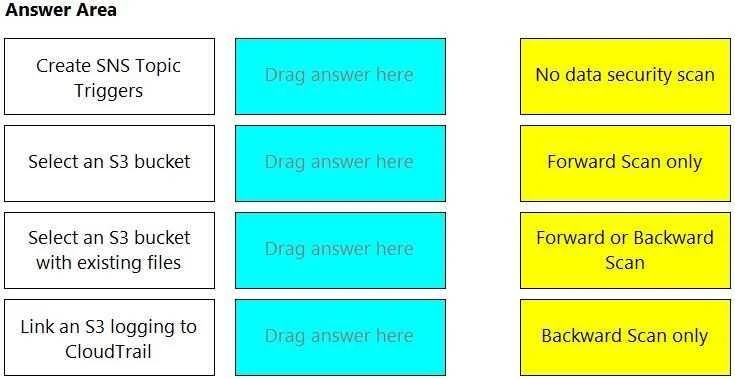
Drag and Drop Question Match the correct scanning mode for each given operation. (Select your answer from the pull-down list. Answers may be used more than once or not at all.) Answer:
The correct answer is Forward or Backward Scan; No data security scan; Backward Scan only; Forward Scan only. This question tests the understanding of data security scanning modes (forward, backward, none) in relation to common AWS S3 operations and integrations like SNS and CloudTrail.
Question
Drag and Drop Question Match the correct scanning mode for each given operation. (Select your answer from the pull-down list. Answers may be used more than once or not at all.) Answer:
Exhibit
Answer Area
Drag items
Correct arrangement
- Forward or Backward Scan
- No data security scan
- Backward Scan only
- Forward Scan only
Explanation
This question tests the understanding of data security scanning modes (forward, backward, none) in relation to common AWS S3 operations and integrations like SNS and CloudTrail.
Approach. The correct approach involves matching each S3 operation to the most appropriate data security scanning mode based on the nature of the operation and the typical scope of data security tools.
- Create SNS Topic Triggers --> Forward or Backward Scan: When setting up SNS topic triggers for data security, especially for a new security solution, it often needs to monitor new objects (forward scan) and potentially process existing objects already in the bucket (backward scan) if a comprehensive initial scan is required. The trigger itself acts on events, and those events could be new uploads or modifications to existing files, which can then initiate a scan process that spans both new and existing data.
- Select an S3 bucket --> No data security scan: Simply selecting or viewing an S3 bucket in the AWS console or programmatically does not initiate any data security scan. It's a navigational or identification action.
- Select an S3 bucket with existing files --> Backward Scan only: If the objective is to perform a security scan on files that already exist in an S3 bucket, the scanning process must look backward in time at the data that has already been stored. A forward scan would only apply to newly uploaded files.
- Link an S3 logging to CloudTrail --> Forward Scan only: AWS CloudTrail captures API calls and related events in your AWS account. When you configure S3 logging to CloudTrail, CloudTrail starts recording S3-related events (like object PUT, GET, DELETE operations) from that point forward. It monitors future activity and does not retroactively scan the content of existing files in the S3 bucket itself. Thus, it's a forward-looking log of events.
Common mistakes.
- common_mistake. Common mistakes include confusing the temporal direction of scanning (forward vs. backward) or misinterpreting the scope of an operation. For example, incorrectly assuming that 'Select an S3 bucket with existing files' would trigger a 'Forward Scan only' ignores that the existing files are historical. Another mistake is believing that 'Link an S3 logging to CloudTrail' performs a content scan or a backward scan, when in reality CloudTrail logs events proactively from the moment logging is enabled. Attributing 'No data security scan' to an operation that clearly involves data processing or event triggers (like SNS) would also be incorrect, as these often integrate with scanning solutions.
Concept tested. The core concept tested is the understanding of data security scanning methodologies (forward vs. backward scanning) in the context of AWS S3 operations, event-driven architectures (SNS triggers), and auditing/logging services (CloudTrail). It assesses knowledge of when and how different scanning modes apply to data at rest and data in motion within AWS S3.
Topics
Community Discussion
No community discussion yet for this question.