
Fortinet
NSE7_PBC-7.2 · Question #15
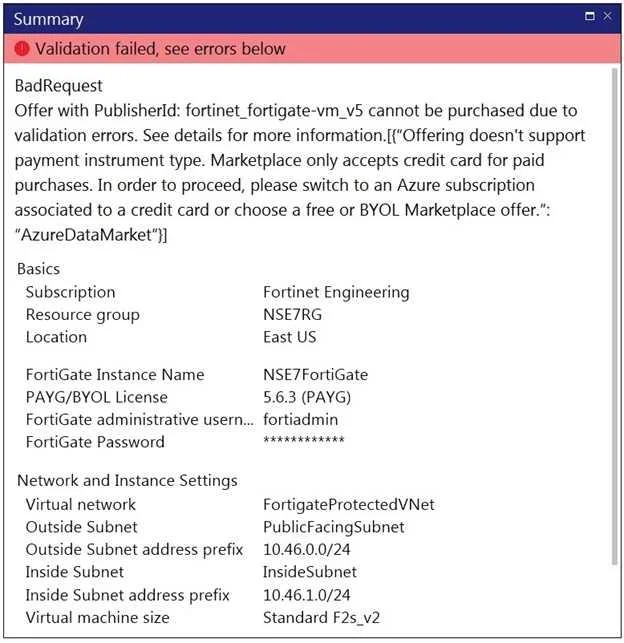
Refer to the exhibit. You are deploying a FortiGate-VM in Microsoft Azure using the PAYG/On- demand licensing model. After you configure the FortiGate-VM, the validation process fails, displaying…
The correct answer is D. You selected the PAYG/On-demand licensing model, but did not associate a valid Azure. See the full explanation below for the reasoning.
Question
Refer to the exhibit. You are deploying a FortiGate-VM in Microsoft Azure using the PAYG/On- demand licensing model. After you configure the FortiGate-VM, the validation process fails, displaying the error shown in the exhibit. What caused the validation process to fail?
Exhibit
Options
- AYou selected the incorrect resource group.
- BYou selected the Bring Your Own License (BYOL) licensing mode.
- CYou selected the PAYG/On-demand licensing model, but did not select correct virtual machine
- DYou selected the PAYG/On-demand licensing model, but did not associate a valid Azure
How the community answered
(38 responses)- A3% (1)
- B11% (4)
- C5% (2)
- D82% (31)
Community Discussion
No community discussion yet for this question.